Welche Eigenschaften muss eine Webanwendung haben, um das Kriterium "progressiv" zu erfüllen? Es ist klar, dass progressive Webanwendungen wie gewöhnliche Webanwendungen auf der Grundlage der "großen drei" Webtechnologien - HTML / CSS / JS - erstellt werden. Aber was genau macht Webanwendungen fortschrittlich?
In dieser Veröffentlichung werde ich versuchen, die Mindestmerkmale zu finden, die eine Webanwendung im Moment erfüllen muss, um als "progressiv" bezeichnet zu werden, und auch die Frage beantworten, warum im August dieses Jahres einige "progressive" Anwendungen nicht mehr so sind.
Auswahlprinzipien für Merkmale
Ich nehme eine leere HTML-Datei und füge nach und nach Artefakte hinzu, die sie in eine PWA verwandeln, bis mein Smartphone diese Anwendung installiert und Chrome keine Warnungen mehr ausgibt. Chrome wurde ausgewählt, weil Google derzeit der Haupttreiber der PWA-Technologie ist.
HTTPS
Das erste, was auf dem Server konfiguriert werden muss, ist die Verkehrsverschlüsselung. Hier wird alles wie bei herkömmlichen Webanwendungen durchgeführt. Persönlich verwende ich Apache httpd und generiere Verschlüsselungszertifikate über Let's Encrypt .
App Shell
Eine Anwendungsshell ist die Mindestmenge an Dateien, mit der eine Anwendung offline ausgeführt werden kann. Ich werde versuchen, den gesamten erforderlichen Code (HTML / CSS / JS) maximal in eine Datei einzupassen - index.html
.
<!DOCTYPE html>
<html lang="en">
<head>
<title>PWA</title>
<style>
BODY {
background-color: #FB9902;
color: #342309;
font-size: xx-large;
margin: 0;
}
DIV {
align-content: center;
display: grid;
height: 100vh;
justify-content: center;
}
</style>
</head>
<body>
<div>App Shell</div>
</body>
</html>
Manifest
Das Manifest ist eine direkte Markierung dafür, dass die Seite Teil einer progressiven Webanwendung ist. Das Manifest ist in der Kopfzeile der HTML-Seite enthalten:
<link rel="manifest" href="demo.pwa.json">
Chrome:

, Chrome :
{
"start_url": "./",
"name": "PWA",
"display": "standalone",
"icons": [
{
"src": "./icon.png",
"sizes": "144x144",
"type": "image/png"
}
]
}
Icon
Chrome', 144x144 PNG, SVG WebP. :
Service Worker
Chrome - service worker'.
Service worker (index.html
):
<script>
if ("serviceWorker" in navigator) {
self.addEventListener("load", async () => {
const container = navigator.serviceWorker;
if (container.controller === null) {
const reg = await container.register("sw.js");
}
});
}
</script>
sw.js
:
'use strict';
Chrome: Page does not work offline
'use strict';
function hndlEventFetch(evt) {}
self.addEventListener('fetch', hndlEventFetch);
:
Site cannot be installed: Page does not work offline. Starting in Chrome 93, the installability criteria is changing, and this site will not be installable. See https://goo.gle/improved-pwa-offline-detection for more information.
Chrome: Version 89.0.4389.72 (Official Build) (64-bit)
, :
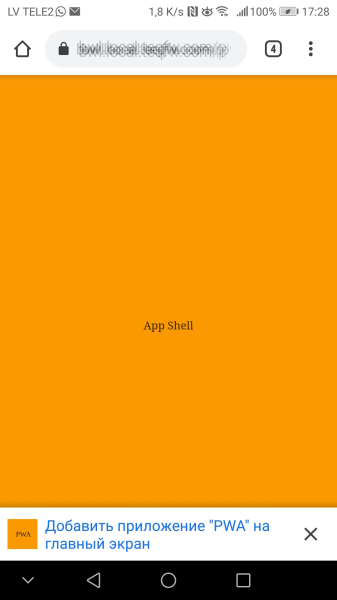
, service worker , ( 2021-) .
PWA 2021-, , . service worker':
'use strict';
const CACHE_STATIC = 'static-cache-v1';
function hndlEventInstall(evt) {
/**
* @returns {Promise<void>}
*/
async function cacheStaticFiles() {
const files = [
'./',
'./demo.pwa.json',
'./icon.png',
'./index.html',
'./sw.js',
];
const cacheStat = await caches.open(CACHE_STATIC);
await Promise.all(
files.map(function (url) {
return cacheStat.add(url).catch(function (reason) {
console.log(`'${url}' failed: ${String(reason)}`);
});
})
);
}
// wait until all static files will be cached
evt.waitUntil(cacheStaticFiles());
}
function hndlEventFetch(evt) {
async function getFromCache() {
const cache = await self.caches.open(CACHE_STATIC);
const cachedResponse = await cache.match(evt.request);
if (cachedResponse) {
return cachedResponse;
}
// wait until resource will be fetched from server and stored in cache
const resp = await fetch(evt.request);
await cache.put(evt.request, resp.clone());
return resp;
}
evt.respondWith(getFromCache());
}
self.addEventListener('install', hndlEventInstall);
self.addEventListener('fetch', hndlEventFetch);
service worker' Chrome 93+. :
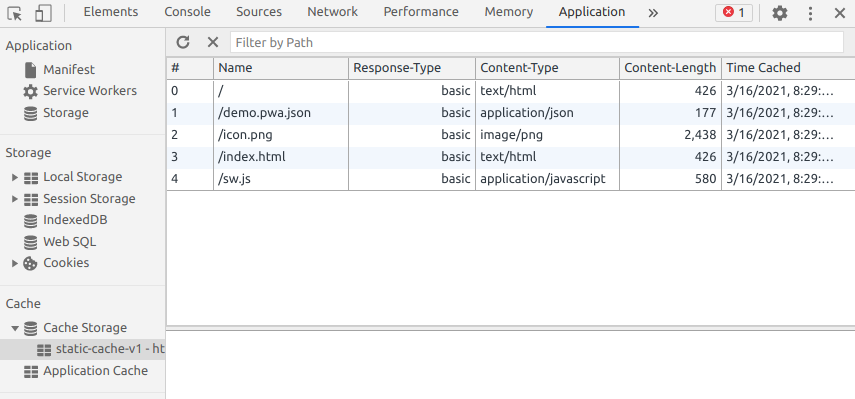
, - favicon.ico
:
GET https://bwl.local.teqfw.com/favicon.ico 404
, PWA.
web- ( 2021-) :
(HTTPS).
( ).
( service worker).
.
Service worker.
.
PWA :
Chrome , 93 web- . PWA , Vue Storefront. Magento 2 , ( , Magento 2 web-).
, Vue Storefront, , , . , e- . , PWA , PWA . -, - - web, - -. web-, serverless ( App Shell, service worker', - ). , web- -, - .
Vue Storefront , . Vue Storefront , Chrome 93+ (, ). , PWA- Magento .
Google PWA, web' . , web- , 100% -. , PWA - :
In December 2020, Firefox for desktop abandoned implementation of PWAs (specifically, removed the prototype "site-specific browser" configuration that had been available as an experimental feature). A Firefox architect noted: "The signal I hope we are sending is that PWA support is not coming to desktop Firefox anytime soon." Mozilla still plans to support PWAs on Android.

- PWA- . "" .
Meiner Meinung nach ist PWA eine "Nischen" -Lösung für mobile Geräte. Ja, es wird mithilfe von Webtechnologien (HTML / CSS / JS) erstellt und im Browser ausgeführt. Die PWA-Entwicklung sollte jedoch eher aus Sicht nativer mobiler Anwendungen als aus Sicht von Webanwendungen (Websites oder SPA) erfolgen ).
Mit anderen Worten, wenn Sie nur eine Webanwendung benötigen, benötigen Sie keine PWA. Wenn Sie jedoch eine mobile Anwendung entwickeln müssen, ist PWA möglicherweise eine akzeptable Option.