PS. Dies ist eine Übersetzung meines Artikels in Englisch. Ich habe lange nicht mehr über Habré geschrieben. Es tut mir sofort leid, ich schreibe nicht viel auf Russisch. Ich werde nicht sagen, dass mein Englisch wunderschön ist. Leider verschlechtert das Leben im Ausland mein Russisch und entwickelt langsam Englisch.
Wenn Sie AWS Athena zum Analysieren von Protokollen verwenden, möchten Sie häufig die Quelle der IP-Adressen ermitteln. Leider bietet AWS Athena dies nicht sofort an. Glücklicherweise bietet MaxMind eine Datenbank mit GeoIP-Tabellen, mit der Sie den Standort anhand der IP-Adresse berechnen können. Es gibt kostenlose und kostenpflichtige Versionen.
In diesem Artikel werde ich Ihnen zeigen, wie Sie eine AWS Lambda-Funktion erstellen, die jede Woche die neueste Datenbank von MaxMind auf S3 herunterlädt. Diese Datenbank kann in AWS Athena verwendet werden, um SQL-Abfragen zur Analyse zu schreiben, z. B. Webprotokolle.
Erstellen eines Kontos bei MaxMind
Um auch kostenlose GeoLite 2- Datenbanken mit MaxMind herunterzuladen, müssen Sie ein Konto erstellen . Nach dem Erstellen eines Kontos können Sie unter Dienste einen Dienstschlüssel generieren. Speichern Sie es. Wir werden das GeoLite2-City-CSV- Format verwenden .
Mit dem Service Key können wir versuchen, die Datenbank mit herunterzuladen curl
curl -o GeoLite2-City-CSV.zip \
'https://download.maxmind.com/app/geoip_download?edition_id=GeoLite2-City-CSV&license_key={{YOUR_LICENSE_KEY}}&suffix=zip'
Die neuesten Anweisungen zum Herunterladen von GeoIP-Datenbanken finden Sie hier .
AWS Lambda-Funktion zum Aktualisieren der GeoIP-Datenbank in S3
Für mein eigenes Projekt habe ich einen S3-Bucket erstellt, s3://app.loshadki.data
in dem ich die GeoIP-Datenbank hosten möchte. Ich werde zwei Tische entlang der Pfade platzieren
s3://app.loshadki.datadata/geoip_blocks/data.csv.gz
- Basis der IP-Masken und deren GEO-Position
s3://app.loshadki.datadata/geoip_locations/data.csv.gz
- Dekodierung von GEO in Adressen (Länder, Städte).
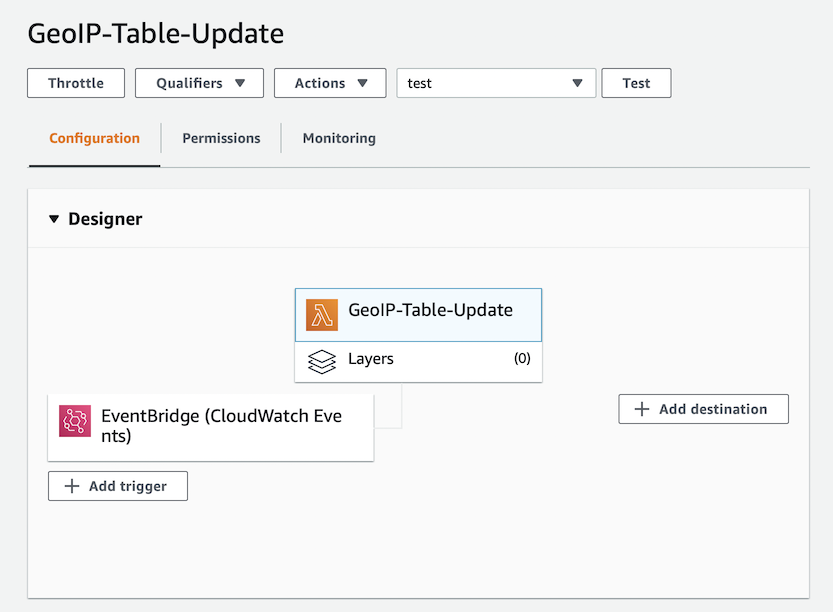
Erstellen Sie eine neue Lambda-Funktion, die ich meine genannt habe GeoIP-Table-Update
, und verwenden Sie sie python:3.8
.
Environment Variables :
MAXMIND_GEOIP_LICENSE
- Service Key MaxMind.
S3_BUCKET_NAME
- S3 Bucket, (app.loshadki.data
).
S3_BUCKET_PREFIX
- ,data

. Timeout 5 . Memory 256MB, CPU, CPU, . , , .

trigger. EventBridge (Cloud Watch Events), upload-geoip-to-s3-weekly
rate(7 days)
.
, AWS Lambda S3, , Role .
{
"Version": "2012-10-17",
"Statement": [
{
"Effect": "Allow",
"Action": "s3:PutObject",
"Resource": "arn:aws:s3:::app.loshadki.data/data/*"
}
]
}

. , Deploy . . , , S3.
import os
import os.path
import urllib.request
import shutil
import zipfile
import tempfile
import gzip
import boto3
def lambda_handler(event, context):
with tempfile.TemporaryDirectory() as tmpdirname:
zipfilename = os.path.join(tmpdirname, 'GeoLite2-City-CSV.zip')
print('step 1 - download geolite ip database')
download_geo_ip(tmpdirname, zipfilename)
print('step 2 - unzip all files')
unzip_all(tmpdirname, zipfilename)
print('step 3 - gzip files')
gzip_files(tmpdirname)
print('step 4 - upload to s3')
upload_to_s3(tmpdirname)
return
def download_geo_ip(tmpdirname, zipfilename):
geoip_url = 'https://download.maxmind.com/app/geoip_download?edition_id=GeoLite2-City-CSV&license_key={}&suffix=zip'.
format(os.getenv('MAXMIND_GEOIP_LICENSE'))
with urllib.request.urlopen(geoip_url) as response, open(zipfilename, 'wb') as output:
shutil.copyfileobj(response, output)
def unzip_all(tmpdirname, zipfilename):
# unzip all, but without the directories, to easily find the files
with zipfile.ZipFile(zipfilename, 'r') as z:
for member in z.namelist():
filename = os.path.basename(member)
# if a directory, skip
if not filename:
continue
# copy file (taken from zipfile's extract)
with z.open(member) as zobj:
with open(os.path.join(tmpdirname, filename), "wb") as targetobj:
shutil.copyfileobj(zobj, targetobj)
def gzip_files(tmpdirname):
for filename in ['GeoLite2-City-Blocks-IPv4.csv', 'GeoLite2-City-Locations-en.csv']:
file_path = os.path.join(tmpdirname, filename)
with open(file_path, 'rb') as f_in,
gzip.open(file_path + '.gz', 'wb') as f_out:
shutil.copyfileobj(f_in, f_out)
def upload_to_s3(tmpdirname):
s3_bucket_name = os.getenv('S3_BUCKET_NAME')
s3_bucket_prefix = os.getenv('S3_BUCKET_PREFIX')
s3_client = boto3.client('s3')
s3_client.upload_file(
os.path.join(tmpdirname, 'GeoLite2-City-Blocks-IPv4.csv.gz'),
s3_bucket_name,
os.path.join(s3_bucket_prefix, 'geoip_blocks/data.csv.gz')
)
s3_client.upload_file(
os.path.join(tmpdirname, 'GeoLite2-City-Locations-en.csv.gz'),
s3_bucket_name,
os.path.join(s3_bucket_prefix, 'geoip_locations/data.csv.gz')
)
AWS Athena
AWS Athena CSV , S3.
IP ( S3, CSV )
CREATE EXTERNAL TABLE IF NOT EXISTS default.geoip_blocks (
network STRING,
geoname_id INT,
registered_country_geoname_id INT,
represented_country_geoname_id INT,
is_anonymous_proxy INT,
is_satellite_provider INT,
postal_code STRING,
latitude DOUBLE,
longitude DOUBLE,
accuracy_radius INT
)
ROW FORMAT DELIMITED
FIELDS TERMINATED BY ','
LINES TERMINATED BY '\n'
LOCATION 's3://app.loshadki.data/data/geoip_blocks/'
TBLPROPERTIES ('skip.header.line.count'='1');
( S3 )
CREATE EXTERNAL TABLE IF NOT EXISTS default.geoip_locations (
geoname_id INT,
locale_code STRING,
continent_code STRING,
continent_name STRING,
country_iso_code STRING,
country_name STRING,
subdivision_1_iso_code STRING,
subdivision_1_name STRING,
subdivision_2_iso_code STRING,
subdivision_2_name STRING,
city_name STRING,
metro_code STRING,
time_zone STRING,
is_in_european_union INT
)
ROW FORMAT SERDE 'org.apache.hadoop.hive.serde2.OpenCSVSerde'
WITH SERDEPROPERTIES (
'separatorChar' = ',',
'quoteChar' = '\"',
'escapeChar' = '\\'
)
LOCATION 's3://app.loshadki.data/data/geoip_locations/'
TBLPROPERTIES ('skip.header.line.count'='1');
SQL
select *
from default.geoip_blocks t1
inner join default.geoip_locations t2 on t1.geoname_id = t2.geoname_id
limit 10
IP (CIDR lookup)
geoip_blocks
CIDR , 1.0.0.0/24
, 1.0.0.0
1.0.0.255
. Presto IP CIDR . AWS Athena ( 2) , Presto 0.217. .
IP Integer, ip_start <= ip_address <= ip_end
. IP Integer , ipv4[1]*256*256*256 + ipv4[2]*256*256 + ipv4[3]*256 + ipv4[4]
. /24
IP .
View geoip_blocks
CREATE OR REPLACE VIEW geoip_blocks_int AS
select
cast(ip[1] as BIGINT)*256*256*256 + cast(ip[2] as BIGINT)*256*256 + cast(ip[3] as BIGINT)*256 + cast(ip[4] as BIGINT) as ip_start,
(
bitwise_or(cast(ip[1] as BIGINT), bitwise_and(255, cast(power(2, greatest(8 - range, 0)) as BIGINT)-1))
)*256*256*256 +
(
bitwise_or(cast(ip[2] as BIGINT), bitwise_and(255, cast(power(2, greatest(16 - range, 0)) as BIGINT)-1))
)*256*256 +
(
bitwise_or(cast(ip[3] as BIGINT), bitwise_and(255, cast(power(2, greatest(24 - range, 0)) as BIGINT)-1))
)*256+
(
bitwise_or(cast(ip[4] as BIGINT), bitwise_and(255, cast(power(2, greatest(32 - range, 0)) as BIGINT)-1))
) as ip_end,
network,
geoname_id,
registered_country_geoname_id,
represented_country_geoname_id,
cast(is_anonymous_proxy as BOOLEAN) as is_anonymous_proxy,
cast(is_satellite_provider as BOOLEAN) as is_satellite_provider,
postal_code,
latitude,
longitude,
accuracy_radius
from
(
select
network,
geoname_id,
registered_country_geoname_id,
represented_country_geoname_id,
is_anonymous_proxy,
is_satellite_provider,
postal_code,
latitude,
longitude,
accuracy_radius,
split(network_array[1], '.') as ip,
cast(network_array[2] as BIGINT) as range
from
(
select
network,
geoname_id,
registered_country_geoname_id,
represented_country_geoname_id,
is_anonymous_proxy,
is_satellite_provider,
postal_code,
latitude,
longitude,
accuracy_radius,
split(network, '/') as network_array
from default.geoip_blocks
)
)
Versuche die Ergebnisse
Zum Beispiel können wir versuchen, den Speicherort der IP-Adresse zu finden 1.1.1.1
. Wir müssen es nur noch einmal in Integer konvertieren.

with ips as (
select
(
cast(ip_array[1] as BIGINT)*256*256*256 +
cast(ip_array[2] as BIGINT)*256*256 +
cast(ip_array[3] as BIGINT)*256 +
cast(ip_array[4] as BIGINT)
) as ip_int,
ip
from (
select
'1.1.1.1' as ip,
split('1.1.1.1', '.') as ip_array
) as source
)
select
ips.ip,
locations.continent_name,
locations.country_name,
locations.city_name,
locations.time_zone
from
ips as ips
left join geoip_blocks_int as blocks on blocks.ip_start <= ips.ip_int and ips.ip_int <= blocks.ip_end
left join geoip_locations as locations on blocks.geoname_id = locations.geoname_id
Nun, eine etwas komplexere SQL-Abfrage, wenn Sie Protokolle von CloudFront haben, um die beliebtesten Seiten anzuzeigen, die nach Land und Stadt gruppiert sind.
with access_logs as (
select
uri,
(
cast(split(ip, '.')[1] as BIGINT)*256*256*256 +
cast(split(ip, '.')[2] as BIGINT)*256*256 +
cast(split(ip, '.')[3] as BIGINT)*256 +
cast(split(ip, '.')[4] as BIGINT)
) as ip_int
from (
select uri,
case xforwarded_for
when '-' then request_ip
else xforwarded_for
end as ip
from access_logs_yesterday
where
sc_content_type = 'text/html'
and status = 200
and method = 'GET'
and not regexp_like(url_decode(user_agent), '(bot|spider)')
)
)
select
count(*) as count,
access_logs.uri as uri,
locations.continent_name,
locations.country_name,
locations.city_name,
locations.time_zone
from
access_logs
left join geoip_blocks_int as blocks on
blocks.ip_start <= access_logs.ip_int and access_logs.ip_int <= blocks.ip_end
left join geoip_locations as locations on blocks.geoname_id = locations.geoname_id
group by 2, 3, 4, 5, 6
order by 1
Was weiter?
Sie können Spalten postal_code
oder city_name
zusammen country_name
mit AWS QuickSight Berichte erstellen. Ich habe auch einen CloudWatch-Alert für mich erstellt, wenn die Funktion mehr als zweimal ausfällt, um festzustellen, ob etwas kaputt ist.