Computer Vision ist ein Bereich der Informatik, der sich auf die Reproduktion von Teilen eines komplexen menschlichen Bildverarbeitungssystems konzentriert und es Computern ermöglicht, Objekte in Bildern und Videos sowie Personen zu identifizieren und zu verarbeiten. Frühe Experimente im Bereich Computer Vision begannen in den 1950er Jahren und wurden erstmals in den 1970er Jahren kommerziell zur Unterscheidung zwischen gedrucktem und handgeschriebenem Text eingesetzt. Heute sind Computer-Vision-Anwendungen exponentiell gewachsen. Dieser Artikel zeigt ein Beispiel dafür, wie Sie Verkehrszeichen mithilfe von Computer Vision erkennen können.

, Kaggle: GTSRB — , (IJCNN) 2011. 50 000 43 . : , - .
.
import os
import matplotlib
import numpy as np
from PIL import Image
from tensorflow.keras.preprocessing.image import img_to_array
from sklearn.model_selection import train_test_split
from keras.utils import to_categorical
from keras.models import Sequential, load_model
from keras.layers import Conv2D, MaxPool2D, Dense, Flatten, Dropout
from tensorflow.keras import backend as K
import matplotlib.pyplot as plt
from sklearn.metrics import accuracy_score
«train», 43 . : data labels. , , .
data = [] labels = []
, os data labels. PIL.
for num in range(0, classes):
path = os.path.join('train',str(num))
imagePaths = os.listdir(path)
for img in imagePaths:
image = Image.open(path + '/'+ img)
image = image.resize((30,30))
image = img_to_array(image)
data.append(image)
labels.append(num)
30×30 data labels.
numpy .
data = np.array(data) labels = np.array(labels)
- (39209, 30, 30, 3), , 39 209 30×30 , 3 , ( RGB).
print(data.shape, labels.shape)
(39209, 30, 30, 3) (39209,)
sklearn
train_test_split()
, 80% 20% . .
X_train, X_test, y_train, y_test = train_test_split(data, labels, test_size=0.2, random_state=42)
print(X_train.shape, X_test.shape, y_train.shape, y_test.shape)
(31367, 30, 30, 3) (7842, 30, 30, 3) (31367,) (7842,)
, .
def cnt_img_in_classes(labels):
count = {}
for i in labels:
if i in count:
count[i] += 1
else:
count[i] = 1
return count
samples_distribution = cnt_img_in_classes (y_train)
def diagram(count_classes):
plt.bar(range(len(dct)), sorted(list(count_classes.values())), align='center')
plt.xticks(range(len(dct)), sorted(list(count_classes.keys())), rotation=90, fontsize=7)
plt.show()
diagram(samples_distribution)
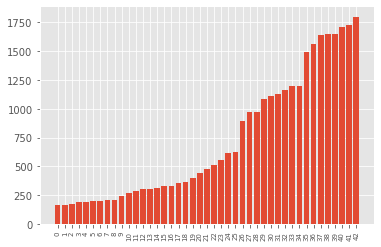
, , , .
def aug_images(images, p):
from imgaug import augmenters as iaa
augs = iaa.SomeOf((2, 4),
[
iaa.Crop(px=(0, 4)),
iaa.Affine(scale={"x": (0.8, 1.2), "y": (0.8, 1.2)}),
iaa.Affine(translate_percent={"x": (-0.2, 0.2), "y": (-0.2, 0.2)}),
iaa.Affine(rotate=(-45, 45))
iaa.Affine(shear=(-10, 10))
])
seq = iaa.Sequential([iaa.Sometimes(p, augs)])
res = seq.augment_images(images)
return res
def augmentation(images, labels):
min_imgs = 500
classes = cnt_img_in_classes(labels)
for i in range(len(classes)):
if (classes[i] < min_imgs):
add_num = min_imgs - classes[i]
imgs_for_augm = []
lbls_for_augm = []
for j in range(add_num):
im_index = random.choice(np.where(labels == i)[0])
imgs_for_augm.append(images[im_index])
lbls_for_augm.append(labels[im_index])
augmented_class = augment_imgs(imgs_for_augm, 1)
augmented_class_np = np.array(augmented_class)
augmented_lbls_np = np.array(lbls_for_augm)
imgs = np.concatenate((images, augmented_class_np), axis=0)
lbls = np.concatenate((labels, augmented_lbls_np), axis=0)
return (images, labels)
X_train, y_train = augmentation(X_train, y_train)
.
print(X_train.shape, X_test.shape, y_train.shape, y_test.shape)
(36256, 30, 30, 3) (7842, 30, 30, 3) (36256,) (7842,)
.
augmented_samples_distribution = cnt_img_in_classes(y_train) diagram(augmented_samples_distribution)
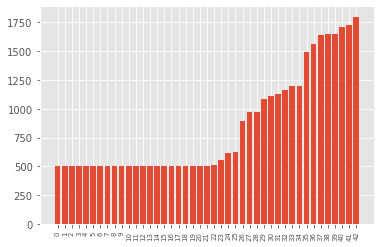
, . keras.utils
to_categorical
, y_train
t_test
, one-hot encoding.
y_train = to_categorical(y_train, 43)
y_test = to_categorical(y_test, 43)
Keras]. , CNN ( ). CNN .
:
2 Conv2D (filter=32, kernel_size=(5,5), activation=”relu”)
MaxPool2D ( pool_size=(2,2))
Dropout (rate=0.25)
2 Conv2D (filter=64, kernel_size=(3,3), activation=”relu”)
MaxPool2D ( pool_size=(2,2))
Dropout (rate=0.25)
Flatten , 1
Dense (500, activation=”relu”)
Dropout (rate=0.5)
Dense (43, activation=”softmax”)
class Net:
@staticmethod
def build(width, height, depth, classes):
model = Sequential()
inputShape = (height, width, depth)
if K.image_data_format() == 'channels_first':
inputShape = (depth, heigth, width)
model = Sequential()
model.add(Conv2D(filters=32, kernel_size=(5,5), activation='relu', input_shape=inputShape))
model.add(Conv2D(filters=32, kernel_size=(5,5), activation='relu'))
model.add(MaxPool2D(pool_size=(2, 2)))
model.add(Dropout(rate=0.25))
model.add(Conv2D(filters=64, kernel_size=(3, 3), activation='relu'))
model.add(Conv2D(filters=64, kernel_size=(3, 3), activation='relu'))
model.add(MaxPool2D(pool_size=(2, 2)))
model.add(Dropout(rate=0.25))
model.add(Flatten())
model.add(Dense(500, activation='relu'))
model.add(Dropout(rate=0.5))
model.add(Dense(classes, activation='softmax'))
return model
Adam
, — categorical_crossentropy
, . model.fit()
.
epochs = 25
model = Net.build(width=30, height=30, depth=3, classes=43)
model.compile(loss='categorical_crossentropy', optimizer='adam', metrics=['accuracy'])
history = model.fit(X_train, y_train, batch_size=64, validation_data=(X_test, y_test), epochs=epochs)

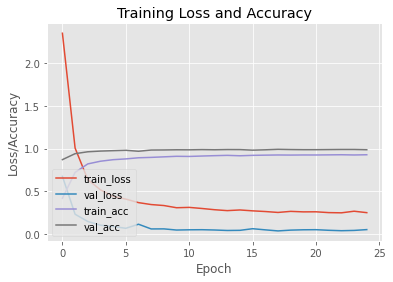
, 25 93% . matplotlib
.
plt.style.use("plot")
plt.figure()
N = epochs
plt.plot(np.arange(0, N), history.history["loss"], label="train_loss")
plt.plot(np.arange(0, N), history.history["val_loss"], label="val_loss")
plt.plot(np.arange(0, N), history.history["accuracy"], label="train_acc")
plt.plot(np.arange(0, N), history.history["val_accuracy"], label="val_acc")
plt.title("Training Loss and Accuracy")
plt.xlabel("Epoch")
plt.ylabel("Loss/Accuracy")
plt.legend(loc="lower left")
plt.show()
Das Dataset enthält einen "Test" -Ordner, und die Datei Test.csv
enthält Informationen zum Bildpfad und zu den Klassenbezeichnungen. Wir extrahieren den Pfad zum Bild und zu den Beschriftungen Test.csv
mithilfe des Frameworks aus der Datei Pandas
. Anschließend ändern wir die Größe des Bilds auf 30 x 30 Pixel und erstellen ein Array, numpy
das alle Bilddaten enthält. Mit accuracy_score
from sklearn metrics
überprüfen wir die Genauigkeit der Vorhersagen unseres Modells. Wir haben bei diesem Modell eine Genauigkeit von 96% erreicht.
y_test = pd.read_csv('Test.csv')
labels = y_test["ClassId"].values
imgs = y_test["Path"].values
images=[]
for img in imgs:
image = Image.open(img)
image = image.resize((30,30))
images.append(img_to_array(image))
X_test=np.array(images)
pred = model.predict_classes(X_test)
print(accuracy_score(labels, pred))
0.958590657165479