
Wenn Sie eine Anwendung erstellen, in der mindestens mehrere Bildschirme angezeigt werden, stellt sich immer die Frage, wie die Navigation am besten implementiert werden kann. Die Frage wird interessanter und schwieriger, wenn Sie eine Anwendung mit mehreren Modulen erstellen. Vor ungefähr anderthalb Jahren habe ich darüber gesprochen, wie Sie die Navigation mit Jetpack in einem Projekt mit mehreren Modulen implementieren können. Und jetzt, nach einer Weile, stolperte ich über meine Implementierung und erkannte, dass es einfacher ist, Module auf demselben Jetpack einfacher zu durchfliegen: ohne Magie und DI.
Projektarchitektur
:

Android : feature- c shared- . app , feature shared.
Single Activity, Activity ,

shared:navigation . .
fun Fragment.navigate(actionId: Int, hostId: Int? = null, data: Serializable? = null) {
val navController = if (hostId == null) {
findNavController()
} else {
Navigation.findNavController(requireActivity(), hostId)
}
val bundle = Bundle().apply { putSerializable("navigation data", data) }
navController.navigate(actionId, bundle)
}
:
actionId - id
hostId - id . ,
data - Serializable
, .
val Fragment.navigationData: Serializable?
get() = arguments?.getSerializable("navigation data")
id , feature . res/value/ids.xml
<?xml version="1.0" encoding="utf-8"?>
<resources>
<item name="host_global" type="id"/>
<item name="host_main" type="id"/>
</resources>
! , .
feature-
splash. , , . : splash .
id : res/value/ids.xml splash
<?xml version="1.0" encoding="utf-8"?>
<resources>
<item name="action_splashFragment_to_mainFragment" type="id"/>
<item name="action_splashFragment_to_onboardingFragment" type="id"/>
</resources>
Id , , shared:navigation. .
id .
import com.example.smmn.shared.navigation.navigate
class SplashFragment : Fragment(R.layout.fragment_splash) {
override fun onViewCreated(view: View, savedInstanceState: Bundle?) {
super.onViewCreated(view, savedInstanceState)
buttonToOnboarding.setOnClickListener {
navigate(R.id.action_splashFragment_to_onboardingFragment)
}
buttonToMain.setOnClickListener {
navigate(R.id.action_splashFragment_to_mainFragment)
}
}
}
, shared:navigation.
.
Activity. . Activity.
class MainActivity : AppCompatActivity(R.layout.activity_main)
activity_main.xml
<?xml version="1.0" encoding="utf-8"?>
<androidx.fragment.app.FragmentContainerView xmlns:android="http://schemas.android.com/apk/res/android"
xmlns:app="http://schemas.android.com/apk/res-auto"
xmlns:tools="http://schemas.android.com/tools"
android:id="@id/host_global"
android:name="androidx.navigation.fragment.NavHostFragment"
android:layout_width="match_parent"
android:layout_height="match_parent"
app:defaultNavHost="true"
app:navGraph="@navigation/navigation_global"
tools:ignore="FragmentTagUsage" />
, . app res/navigation/navigation_global.xml
<?xml version="1.0" encoding="utf-8"?>
<navigation xmlns:android="http://schemas.android.com/apk/res/android"
xmlns:app="http://schemas.android.com/apk/res-auto"
android:id="@+id/navigation_global"
app:startDestination="@id/splashFragment">
<fragment
android:id="@+id/splashFragment"
android:name="com.example.smmn.feature.splash.SplashFragment"
android:label="SplashFragment">
<action
android:id="@id/action_splashFragment_to_mainFragment"
app:destination="@id/mainFragment"
app:popUpTo="@id/navigation_global" />
<action
android:id="@id/action_splashFragment_to_onboardingFragment"
app:destination="@id/onboardingFragment"
app:popUpTo="@id/navigation_global" />
</fragment>
<fragment
android:id="@+id/mainFragment"
android:name="com.example.smmn.feature.main.MainFragment"
android:label="MainFragment" >
<action
android:id="@id/action_mainFragment_to_splashFragment"
app:popUpTo="@id/navigation_global"
app:destination="@id/splashFragment" />
</fragment>
<fragment
android:id="@+id/onboardingFragment"
android:name="com.example.smmn.feature.onboarding.OnboardingFragment"
android:label="OnboardingFragment">
<action
android:id="@id/action_onboardingFragment_to_mainFragment"
app:destination="@id/mainFragment"
app:popUpTo="@id/navigation_global" />
</fragment>
</navigation>
, action () . , , "Back".
, id +, id , id, feature .
id splash
<item name="action_splashFragment_to_mainFragment" type="id"/>
<item name="action_splashFragment_to_onboardingFragment" type="id"/>
<action
android:id="@id/action_splashFragment_to_mainFragment"
app:destination="@id/mainFragment"
app:popUpTo="@id/navigation_global" />
<action
android:id="@id/action_splashFragment_to_onboardingFragment"
app:destination="@id/onboardingFragment"
app:popUpTo="@id/navigation_global" />
Jetpack . , BottomNavigation .
.

navigation-ui, .
main BottomNavigation res/menu/menu_main.xml
<?xml version="1.0" encoding="utf-8"?>
<menu xmlns:android="http://schemas.android.com/apk/res/android">
<item
android:id="@+id/profileFragment"
android:icon="@drawable/ic_baseline_account_circle_24"
android:title="@string/main_menu_title_profile" />
<item
android:id="@+id/settingsFragment"
android:icon="@drawable/ic_baseline_settings_24"
android:title="@string/main_menu_title_settings" />
</menu>
res/navigation/navigation_main.xml
<?xml version="1.0" encoding="utf-8"?>
<navigation xmlns:android="http://schemas.android.com/apk/res/android"
xmlns:app="http://schemas.android.com/apk/res-auto"
android:id="@+id/navigation_main"
app:startDestination="@id/profileFragment">
<fragment
android:id="@+id/profileFragment"
android:name="com.example.smmn.feature.profile.ProfileFragment"
android:label="ProfileFragment">
<action
android:id="@id/action_profileFragment_to_infoFragment"
app:destination="@id/infoFragment" />
</fragment>
<fragment
android:id="@+id/settingsFragment"
android:name="com.example.smmn.feature.settings.SettingsFragment"
android:label="SettingsFragment" />
<fragment
android:id="@+id/infoFragment"
android:name="com.example.smmn.feature.info.InfoFragment"
android:label="InfoFragment" />
</navigation>
id res/menu/menu_main.xml. , id .
res/layout/fragment_main.xml
<?xml version="1.0" encoding="utf-8"?>
<androidx.constraintlayout.widget.ConstraintLayout xmlns:android="http://schemas.android.com/apk/res/android"
xmlns:app="http://schemas.android.com/apk/res-auto"
android:layout_width="match_parent"
android:layout_height="match_parent">
<fragment
android:id="@id/host_main"
android:name="androidx.navigation.fragment.NavHostFragment"
android:layout_width="match_parent"
android:layout_height="0dp"
app:defaultNavHost="true"
app:layout_constraintBottom_toTopOf="@+id/bottomNavigationView"
app:layout_constraintEnd_toEndOf="parent"
app:layout_constraintStart_toStartOf="parent"
app:layout_constraintTop_toTopOf="parent"
app:navGraph="@navigation/navigation_main" />
<com.google.android.material.bottomnavigation.BottomNavigationView
android:id="@+id/bottomNavigationView"
android:layout_width="match_parent"
android:layout_height="wrap_content"
android:background="@android:color/white"
app:elevation="8dp"
app:layout_constraintBottom_toBottomOf="parent"
app:layout_constraintEnd_toEndOf="parent"
app:layout_constraintStart_toStartOf="parent"
app:menu="@menu/menu_main" />
</androidx.constraintlayout.widget.ConstraintLayout>
bottomNavigationView
class MainFragment : Fragment(R.layout.fragment_main) {
override fun onViewCreated(view: View, savedInstanceState: Bundle?) {
super.onViewCreated(view, savedInstanceState)
NavigationUI.setupWithNavController(
bottomNavigationView,
Navigation.findNavController(requireActivity(), R.id.host_main)
)
}
}
, , , . , c : .
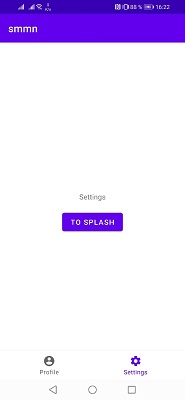
, ( , ) , . , .
, id . , shared:navigation.
class SettingsFragment : Fragment(R.layout.fragment_settings) {
override fun onViewCreated(view: View, savedInstanceState: Bundle?) {
super.onViewCreated(view, savedInstanceState)
buttonToSplash.setOnClickListener {
navigate(R.id.action_mainFragment_to_splashFragment, R.id.host_global)
}
}
}
Id res/values/ids.xml
<?xml version="1.0" encoding="utf-8"?>
<resources>
<item name="action_mainFragment_to_splashFragment" type="id"/>
</resources>
, bundle. - Serializable .
, Serializable . .
Serializable , , , , . shared:model Serializable Info.
data class Info(
val name: String,
val surname: String
) : Serializable
profile info. Info .
class ProfileFragment : Fragment(R.layout.fragment_profile) {
override fun onViewCreated(view: View, savedInstanceState: Bundle?) {
super.onViewCreated(view, savedInstanceState)
buttonToInfo.setOnClickListener {
navigate(R.id.action_profileFragment_to_infoFragment, data = Info("name", "surname"))
}
}
}
, .
class InfoFragment : Fragment(R.layout.fragment_info) {
override fun onViewCreated(view: View, savedInstanceState: Bundle?) {
super.onViewCreated(view, savedInstanceState)
val info = navigationData as? Info ?: return
textView.text = info.toString()
}
}
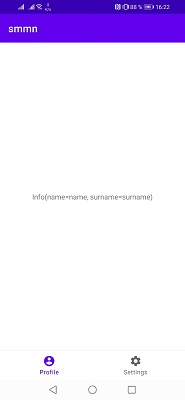
, , .
, Jetpack . , , .
!