Wenn ich mit Dateien in Node.js arbeite, verlässt mich der Gedanke nicht, dass ich viel von der gleichen Art von Code schreibe. Das Erstellen, Lesen und Schreiben, Verschieben, Löschen, Umgehen von Dateien und Unterverzeichnissen wird durch eine unglaubliche Menge an Boilerplate überwachsen, was durch die seltsamen Namen der Funktionen des Moduls noch verstärkt wird fs
. Sie können mit all dem leben, aber der Gedanke daran, was bequemer gemacht werden kann, hat mich nicht verlassen. Ich wollte, dass elementare Dinge wie zum Beispiel das Lesen oder Schreiben von Text (oder json) in eine Datei in einer Zeile geschrieben werden.
Infolge dieser Überlegungen erschien die FSTB-Bibliothek, in der ich versuchte, die Interaktionsmöglichkeiten mit dem Dateisystem zu verbessern. Sie können entscheiden, ob es mir gelungen ist oder nicht, indem Sie diesen Artikel lesen und die Bibliothek in Aktion testen.
Hintergrund
Die Arbeit mit Dateien in einem Knoten erfolgt in mehreren Schritten: Verleugnung, Wut, Verhandlung ... zuerst erhalten wir auf irgendeine Weise den Pfad zum Dateisystemobjekt, dann überprüfen wir dessen Existenz (falls erforderlich), dann arbeiten wir damit. Das Arbeiten mit Pfaden in einem Knoten wird im Allgemeinen in ein separates Modul verschoben. Die coolste Funktion zum Arbeiten mit Pfaden ist path.join
. Eine wirklich coole Sache, die mir, als ich anfing, ein paar Nervenzellen zu ersparen.
Es gibt jedoch ein Problem mit Pfaden. Der Pfad ist eine Zeichenfolge, obwohl er im Wesentlichen die Position des Objekts in der hierarchischen Struktur beschreibt. Und da es sich um ein Objekt handelt, sollten Sie dieselben Mechanismen verwenden, um damit zu arbeiten, wie wenn Sie mit normalen JavaScript-Objekten arbeiten.
Das Hauptproblem besteht darin, dass ein Dateisystemobjekt einen beliebigen Namen aus den zulässigen Zeichen haben kann. Wenn ich dieses Objekt Methoden für die Arbeit damit mache, stellt sich heraus, dass zum Beispiel dieser Code: root.home.mydir.unlink
mehrdeutig ist - aber was ist, wenn das Verzeichnis mydir
ein Verzeichnis hat unlink
? Und dann was? Möchte ich löschen mydir
oder verweisen unlink
?
Einmal habe ich mit Javascript Prox experimentiert und mir eine interessante Konstruktion ausgedacht:
const FSPath = function(path: string): FSPathType {
return new Proxy(() => path, {
get: (_, key: string) => FSPath(join(path, key)),
}) as FSPathType;
};
FSPath
– , , , , Proxy
, FSPath
, . , , :
FSPath(__dirname).node_modules // path.join(__dirname, "node_modules")
FSPath(__dirname)["package.json"] // path.join(__dirname, "package.json")
FSPath(__dirname)["node_modules"]["fstb"]["package.json"] // path.join(__dirname, "node_modules", "fstb", "package.json")
, , . :
const package_json = FSPath(__dirname).node_modules.fstb["package.json"]
console.log(package_json()) // < >/node_modules/fstb/package.json
, , JS. – , , :
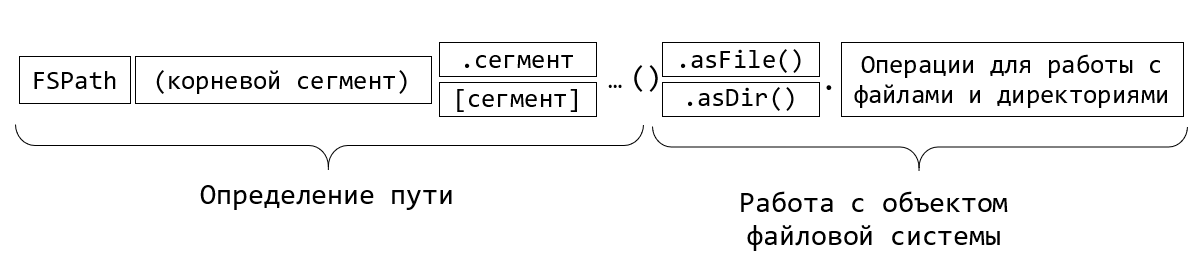
FSTB – FileSystem ToolBox.
FSTB:
npm i fstb
:
const fstb = require('fstb');
FSPath
, : cwd
, dirname
, home
tmp
( ). envPath
.
:
fstb.cwd["README.md"]().asFile().read.txt().then(txt=>console.log(txt));
FSTB , async/await:
(async function() {
const package_json = await fstb.cwd["package.json"]().asFile().read.json();
console.log(package_json);
})();
json . , , , .
, - :
const fs = require("fs/promises");
const path = require("path");
(async function() {
const package_json_path = path.join(process.cwd(), "package.json");
const file_content = await fs.readFile(package_json_path, "utf8");
const result = JSON.parse(file_content);
console.log(result);
})();
, , , .
const fs = require('fs');
const readline = require('readline');
async function processLineByLine() {
const fileStream = fs.createReadStream('input.txt');
const rl = readline.createInterface({
input: fileStream,
crlfDelay: Infinity
});
// Note: we use the crlfDelay option to recognize all instances of CR LF
// ('\r\n') in input.txt as a single line break.
for await (const line of rl) {
// Each line in input.txt will be successively available here as `line`.
console.log(`Line from file: ${line}`);
}
}
processLineByLine();
FSTB:
(async function() {
await fstb.cwd['package.json']()
.asFile()
.read.lineByLine()
.forEach(line => console.log(`Line from file: ${line}`));
})();
, . , . , , filter
, map
, reduce
.. , , , csv, .map(line => line.split(','))
.
, . . :
(async function() {
const string_to_write = ' !';
await fstb.cwd['habr.txt']()
.asFile()
.write.txt(string_to_write);
})();
:
await fstb.cwd['habr.txt']()
.asFile()
.write.appendFile(string_to_write, {encoding:"utf8"});
json:
(async function() {
const object_to_write = { header: ' !', question: ' ', answer: 42 };
await fstb.cwd['habr.txt']()
.asFile()
.write.json(object_to_write);
})();
:
(async function() {
const file = fstb.cwd['million_of_randoms.txt']().asFile();
//
const stream = file.write.createWriteStream();
stream.on('open', () => {
for (let index = 0; index < 1_000_000; index++) {
stream.write(Math.random() + '\n');
}
stream.end();
});
await stream;
//
const lines = await file.read.lineByLine().reduce(acc => ++acc, 0);
console.log(`${lines} lines count`);
})();
, ? :
await stream; // <= WTF?!!
, WriteStream
, . , , , await
. , await
.
, , . FSTB? , fs.
:
const stat = await file.stat()
console.log(stat);
:
Stats {
dev: 1243191443,
mode: 33206,
nlink: 1,
uid: 0,
gid: 0,
rdev: 0,
blksize: 4096,
ino: 26740122787869450,
size: 19269750,
blocks: 37640,
atimeMs: 1618579566188.5884,
mtimeMs: 1618579566033.8242,
ctimeMs: 1618579566033.8242,
birthtimeMs: 1618579561341.9297,
atime: 2021-04-16T13:26:06.189Z,
mtime: 2021-04-16T13:26:06.034Z,
ctime: 2021-04-16T13:26:06.034Z,
birthtime: 2021-04-16T13:26:01.342Z
}
-:
const fileHash = await file.hash.md5();
console.log("File md5 hash:", fileHash);
// File md5 hash: 5a0a221c0d24154b850635606e9a5da3
:
const renamedFile = await file.rename(`${fileHash}.txt`);
:
// ,
// "temp"
const targetDir = renamedFile.fsdir.fspath.temp().asDir()
if(!(await targetDir.isExists())) await targetDir.mkdir()
//
const fileCopy = await renamedFile.copyTo(targetDir)
const fileCopyHash = await fileCopy.hash.md5();
console.log("File copy md5 hash:", fileCopyHash);
// File md5 hash: 5a0a221c0d24154b850635606e9a5da3
:
await renamedFile.unlink();
, , :
console.log({
isExists: await file.isExists(),
isReadable: await file.isReadable(),
isWritable: await file.isWritable() });
, , , .
:
, – . , . , FSTB . FSDir
, :
// FSDir node_modules:
const node_modules = fstb.cwd.node_modules().asDir();
? -, :
//
await node_modules.subdirs().forEach(async dir => console.log(dir.name));
filter, map, reduce, forEach, toArray. , , «@» .
const ileSizes = await node_modules
.subdirs()
.filter(async dir => dir.name.startsWith('@'))
.map(async dir => ({ name: dir.name, size: await dir.totalSize() })).toArray();
fileSizes.sort((a,b)=>b.size-a.size);
console.table(fileSizes);
- :
┌─────────┬──────────────────────┬─────────┐
│ (index) │ name │ size │
├─────────┼──────────────────────┼─────────┤
│ 0 │ '@babel' │ 6616759 │
│ 1 │ '@typescript-eslint' │ 2546010 │
│ 2 │ '@jest' │ 1299423 │
│ 3 │ '@types' │ 1289380 │
│ 4 │ '@webassemblyjs' │ 710238 │
│ 5 │ '@nodelib' │ 512000 │
│ 6 │ '@rollup' │ 496226 │
│ 7 │ '@bcoe' │ 276877 │
│ 8 │ '@xtuc' │ 198883 │
│ 9 │ '@istanbuljs' │ 70704 │
│ 10 │ '@sinonjs' │ 37264 │
│ 11 │ '@cnakazawa' │ 25057 │
│ 12 │ '@size-limit' │ 14831 │
│ 13 │ '@polka' │ 6953 │
└─────────┴──────────────────────┴─────────┘
, , ))
. , typescript . , :
const ts_versions = await node_modules
.subdirs()
.map(async dir => ({
dir,
package_json: dir.fspath['package.json']().asFile(),
}))
// package.json
.filter(async ({ package_json }) => await package_json.isExists())
// package.json
.map(async ({ dir, package_json }) => ({
dir,
content: await package_json.read.json(),
}))
// devDependencies.typescript package.json
.filter(async ({ content }) => content.devDependencies?.typescript)
// typescript
.map(async ({ dir, content }) => ({
name: dir.name,
ts_version: content.devDependencies.typescript,
}))
.toArray();
console.table(ts_versions);
:
┌─────────┬─────────────────────────────┬───────────────────────┐
│ (index) │ name │ ts_version │
├─────────┼─────────────────────────────┼───────────────────────┤
│ 0 │ 'ajv' │ '^3.9.5' │
│ 1 │ 'ast-types' │ '3.9.7' │
│ 2 │ 'axe-core' │ '^3.5.3' │
│ 3 │ 'bs-logger' │ '3.x' │
│ 4 │ 'chalk' │ '^2.5.3' │
│ 5 │ 'chrome-trace-event' │ '^2.8.1' │
│ 6 │ 'commander' │ '^3.6.3' │
│ 7 │ 'constantinople' │ '^2.7.1' │
│ 8 │ 'css-what' │ '^4.0.2' │
│ 9 │ 'deepmerge' │ '=2.2.2' │
│ 10 │ 'enquirer' │ '^3.1.6' │
...
?
. fspath:
// FSDir node_modules:
const node_modules = fstb.cwd.node_modules().asDir();
// "package.json" "fstb"
const package_json = node_modules.fspath.fstb["package.json"]().asFile()
, temp . FSTB mkdtemp
.
mkdir
. copyTo
moveTo
. - rmdir
( ) rimraf
( ).
:
//
const temp_dir = await fstb.mkdtemp("fstb-");
if(await temp_dir.isExists()) console.log(" ")
// : src, target1 target2
const src = await temp_dir.fspath.src().asDir().mkdir();
const target1 = await temp_dir.fspath.target1().asDir().mkdir();
const target2 = await temp_dir.fspath.target2().asDir().mkdir();
// src :
const test_txt = src.fspath["test.txt"]().asFile();
await test_txt.write.txt(", !");
// src target1
const src_copied = await src.copyTo(target1);
// src target2
const src_movied = await src.moveTo(target2);
//
// subdirs(true) –
await temp_dir.subdirs(true).forEach(async dir=>{
await dir.files().forEach(async file=>console.log(file.path))
})
// ,
console.log(await src_copied.fspath["test.txt"]().asFile().read.txt())
console.log(await src_movied.fspath["test.txt"]().asFile().read.txt())
//
await temp_dir.rimraf()
if(!(await temp_dir.isExists())) console.log(" ")
:
C:\Users\debgger\AppData\Local\Temp\fstb-KHT0zv\target1\src\test.txt C:\Users\debgger\AppData\Local\Temp\fstb-KHT0zv\target2\src\test.txt , ! , !
, , . , join’ , .
, Node.js. , . FSTB . , , , , .
, FSTB, :
.
, IDE .
,
Node.js 10- ,
, , , FSPath, , , . .
, , . , . , , .
GitHub: https://github.com/debagger/fstb
: https://debagger.github.io/fstb/
Vielen Dank für Ihre Aufmerksamkeit!