In diesem Artikel werde ich Ihnen erklären und zeigen, wie Sie schöne animierte Listen basierend auf RecyclerView und MotionLayout erstellen. Ich habe in einem meiner Projekte eine ähnliche Methode angewendet.
Vom Übersetzer: Das Repository des Autors des Artikels lautet https://github.com/mjmanaog/foodbuddy .
Ich gabelte es, um zu übersetzen. Vielleicht passt die "russische Version" mehr zu jemandem.
Was ist MotionLayout?
Kurz gesagt, MotionLayout ist eine ConstraintLayout-Unterklasse, mit der Sie die Bewegung und Animation von darauf befindlichen Elementen mithilfe von XML beschreiben können. Weitere Details - in der Dokumentation und hier mit Beispielen.
Also fangen wir an.
Schritt 1: Erstellen Sie ein neues Projekt
Nennen wir es wie du willst. Wählen Sie Leere Aktivität als Aktivität aus.
Schritt 2: Fügen Sie die erforderlichen Abhängigkeiten hinzu
Zur Gradle-Datei der Anwendung hinzufügen:
implementation 'androidx.constraintlayout:constraintlayout:2.0.0-beta1'
Beginnen wir mit der Synchronisation (Jetzt synchronisieren in der oberen rechten Ecke).
Schritt 3: Erstellen Sie ein Layout
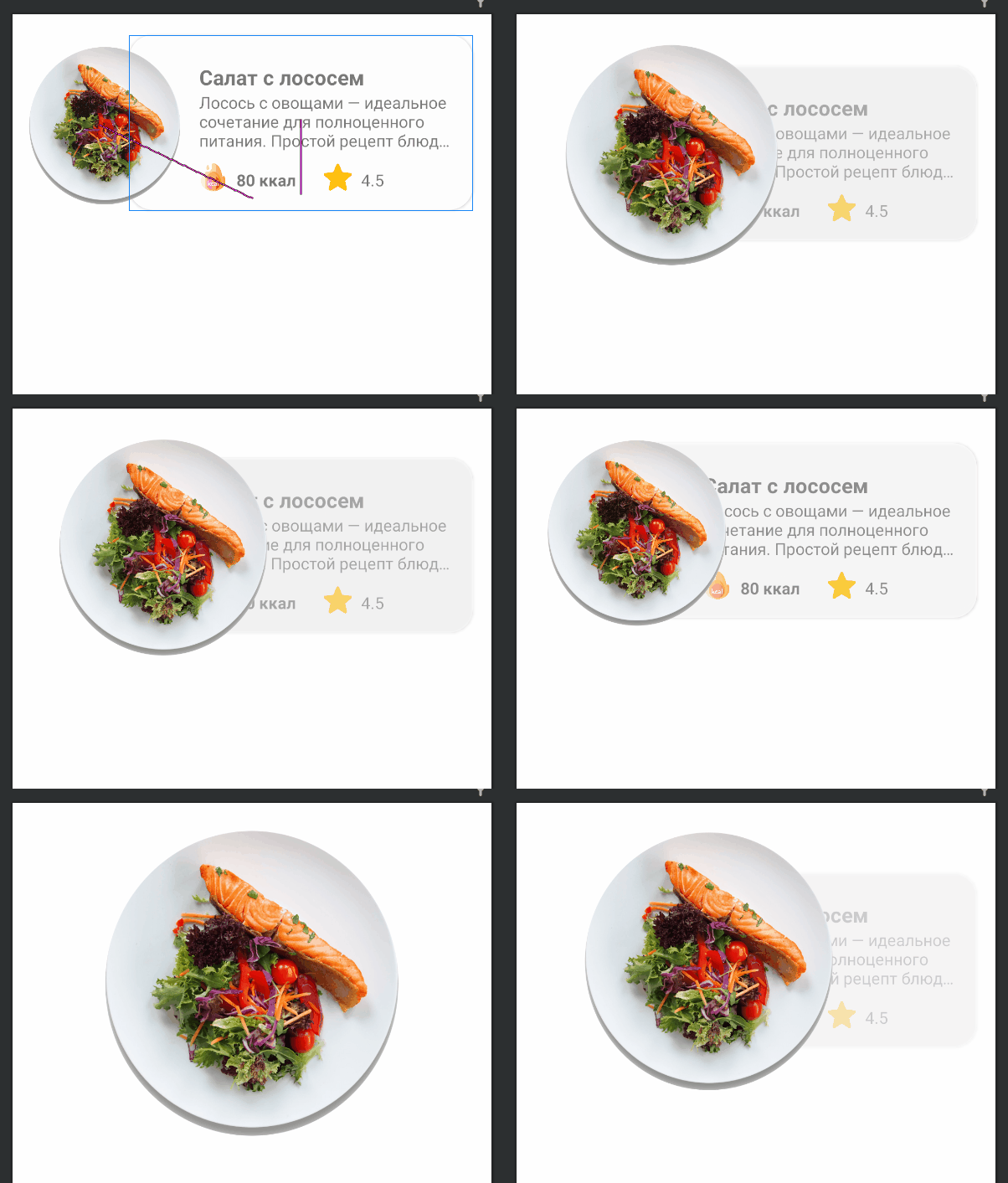
Unser zukünftiger Listeneintrag wird folgendermaßen aussehen:

res/layout item_food.
<?xml version="1.0" encoding="utf-8"?>
<androidx.constraintlayout.widget.ConstraintLayout xmlns:android="http://schemas.android.com/apk/res/android"
xmlns:app="http://schemas.android.com/apk/res-auto"
xmlns:tools="http://schemas.android.com/tools"
android:id="@+id/clMain"
android:layout_width="match_parent"
android:layout_height="wrap_content"
app:layoutDescription="@xml/item_food_scene">
<ImageView
android:id="@+id/ivFood"
android:layout_width="150dp"
android:layout_height="150dp"
android:layout_marginTop="8dp"
android:elevation="10dp"
android:scaleType="fitXY"
app:layout_constraintBottom_toBottomOf="parent"
app:layout_constraintStart_toStartOf="parent"
app:layout_constraintTop_toTopOf="parent"
app:srcCompat="@drawable/img_salmon_salad" />
<androidx.cardview.widget.CardView
android:id="@+id/cardView"
android:layout_width="match_parent"
android:layout_height="150dp"
android:layout_marginStart="100dp"
android:layout_marginLeft="100dp"
android:layout_marginTop="16dp"
android:layout_marginEnd="16dp"
android:layout_marginRight="16dp"
android:layout_marginBottom="16dp"
app:cardCornerRadius="20dp"
app:layout_constraintBottom_toBottomOf="parent"
app:layout_constraintEnd_toEndOf="parent"
app:layout_constraintStart_toStartOf="parent"
app:layout_constraintTop_toTopOf="parent">
<androidx.constraintlayout.widget.ConstraintLayout
android:layout_width="match_parent"
android:layout_height="match_parent">
<TextView
android:id="@+id/tvTitle"
android:layout_width="0dp"
android:layout_height="wrap_content"
android:layout_marginStart="60dp"
android:layout_marginLeft="60dp"
android:layout_marginTop="24dp"
android:layout_marginEnd="8dp"
android:layout_marginRight="8dp"
android:textSize="18sp"
android:textStyle="bold"
app:layout_constraintEnd_toEndOf="parent"
app:layout_constraintStart_toStartOf="parent"
app:layout_constraintTop_toTopOf="parent"
tools:text=" " />
<TextView
android:id="@+id/tvDescription"
android:layout_width="0dp"
android:layout_height="wrap_content"
android:layout_marginStart="60dp"
android:layout_marginLeft="60dp"
android:layout_marginEnd="16dp"
android:layout_marginRight="8dp"
android:ellipsize="end"
android:maxLines="3"
app:layout_constraintEnd_toEndOf="parent"
app:layout_constraintStart_toStartOf="parent"
app:layout_constraintTop_toBottomOf="@+id/tvTitle"
tools:text=" — . , : , ." />
<TextView
android:id="@+id/tvCalories"
android:layout_width="wrap_content"
android:layout_height="wrap_content"
android:layout_marginStart="8dp"
android:layout_marginLeft="8dp"
android:layout_marginBottom="16dp"
android:textStyle="bold"
app:layout_constraintBottom_toBottomOf="parent"
app:layout_constraintStart_toEndOf="@+id/imageView6"
tools:text="80 " />
<ImageView
android:id="@+id/imageView6"
android:layout_width="24dp"
android:layout_height="24dp"
android:layout_marginStart="60dp"
android:layout_marginLeft="60dp"
android:layout_marginBottom="16dp"
app:layout_constraintBottom_toBottomOf="parent"
app:layout_constraintStart_toStartOf="parent"
app:srcCompat="@drawable/ic_calories" />
<ImageView
android:id="@+id/imageView7"
android:layout_width="24dp"
android:layout_height="24dp"
android:layout_marginStart="24dp"
android:layout_marginLeft="24dp"
android:layout_marginBottom="16dp"
app:layout_constraintBottom_toBottomOf="parent"
app:layout_constraintStart_toEndOf="@+id/tvCalories"
app:srcCompat="@drawable/ic_star" />
<TextView
android:id="@+id/tvRate"
android:layout_width="wrap_content"
android:layout_height="wrap_content"
android:layout_marginStart="8dp"
android:layout_marginLeft="8dp"
android:layout_marginBottom="16dp"
app:layout_constraintBottom_toBottomOf="parent"
app:layout_constraintStart_toEndOf="@+id/imageView7"
tools:text="4.5" />
</androidx.constraintlayout.widget.ConstraintLayout>
</androidx.cardview.widget.CardView>
</androidx.constraintlayout.widget.ConstraintLayout>
4: ConstraintLayout MotionLayout
ConstraintLayout MotionLayout:
Split Design;
(Component Tree) ( — clMain);
Convert to MotionLayout.
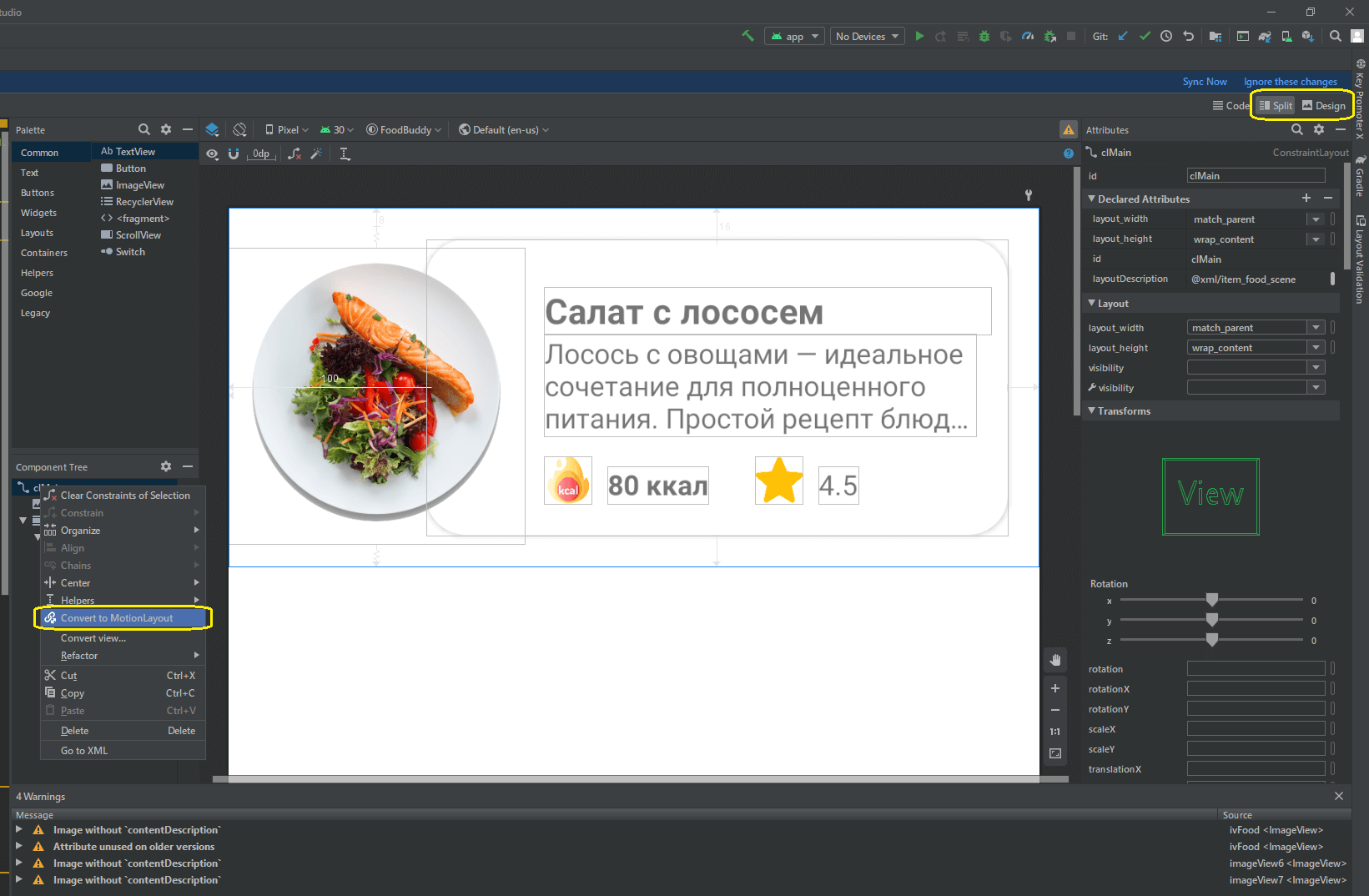
MotionLayout.
item_food
<?xml version="1.0" encoding="utf-8"?>
<androidx.constraintlayout.motion.widget.MotionLayout xmlns:android="http://schemas.android.com/apk/res/android"
xmlns:app="http://schemas.android.com/apk/res-auto"
xmlns:tools="http://schemas.android.com/tools"
android:id="@+id/clMain"
android:layout_width="match_parent"
android:layout_height="wrap_content"
app:layoutDescription="@xml/item_food_scene">
<ImageView
android:id="@+id/ivFood"
android:layout_width="150dp"
android:layout_height="150dp"
android:layout_marginTop="8dp"
android:elevation="10dp"
android:scaleType="fitXY"
app:layout_constraintBottom_toBottomOf="parent"
app:layout_constraintStart_toStartOf="parent"
app:layout_constraintTop_toTopOf="parent"
app:srcCompat="@drawable/img_salmon_salad" />
<androidx.cardview.widget.CardView
android:id="@+id/cardView"
android:layout_width="match_parent"
android:layout_height="150dp"
android:layout_marginStart="100dp"
android:layout_marginLeft="100dp"
android:layout_marginTop="16dp"
android:layout_marginEnd="16dp"
android:layout_marginRight="16dp"
android:layout_marginBottom="16dp"
app:cardCornerRadius="20dp"
app:layout_constraintBottom_toBottomOf="parent"
app:layout_constraintEnd_toEndOf="parent"
app:layout_constraintStart_toStartOf="parent"
app:layout_constraintTop_toTopOf="parent">
<androidx.constraintlayout.widget.ConstraintLayout
android:layout_width="match_parent"
android:layout_height="match_parent">
<TextView
android:id="@+id/tvTitle"
android:layout_width="0dp"
android:layout_height="wrap_content"
android:layout_marginStart="60dp"
android:layout_marginLeft="60dp"
android:layout_marginTop="24dp"
android:layout_marginEnd="8dp"
android:layout_marginRight="8dp"
android:textSize="18sp"
android:textStyle="bold"
app:layout_constraintEnd_toEndOf="parent"
app:layout_constraintStart_toStartOf="parent"
app:layout_constraintTop_toTopOf="parent"
tools:text=" " />
<TextView
android:id="@+id/tvDescription"
android:layout_width="0dp"
android:layout_height="wrap_content"
android:layout_marginStart="60dp"
android:layout_marginLeft="60dp"
android:layout_marginEnd="16dp"
android:layout_marginRight="8dp"
android:ellipsize="end"
android:maxLines="3"
app:layout_constraintEnd_toEndOf="parent"
app:layout_constraintStart_toStartOf="parent"
app:layout_constraintTop_toBottomOf="@+id/tvTitle"
tools:text=" — . , : , ." />
<TextView
android:id="@+id/tvCalories"
android:layout_width="wrap_content"
android:layout_height="wrap_content"
android:layout_marginStart="8dp"
android:layout_marginLeft="8dp"
android:layout_marginBottom="16dp"
android:textStyle="bold"
app:layout_constraintBottom_toBottomOf="parent"
app:layout_constraintStart_toEndOf="@+id/imageView6"
tools:text="80 " />
<ImageView
android:id="@+id/imageView6"
android:layout_width="24dp"
android:layout_height="24dp"
android:layout_marginStart="60dp"
android:layout_marginLeft="60dp"
android:layout_marginBottom="16dp"
app:layout_constraintBottom_toBottomOf="parent"
app:layout_constraintStart_toStartOf="parent"
app:srcCompat="@drawable/ic_calories" />
<ImageView
android:id="@+id/imageView7"
android:layout_width="24dp"
android:layout_height="24dp"
android:layout_marginStart="24dp"
android:layout_marginLeft="24dp"
android:layout_marginBottom="16dp"
app:layout_constraintBottom_toBottomOf="parent"
app:layout_constraintStart_toEndOf="@+id/tvCalories"
app:srcCompat="@drawable/ic_star" />
<TextView
android:id="@+id/tvRate"
android:layout_width="wrap_content"
android:layout_height="wrap_content"
android:layout_marginStart="8dp"
android:layout_marginLeft="8dp"
android:layout_marginBottom="16dp"
app:layout_constraintBottom_toBottomOf="parent"
app:layout_constraintStart_toEndOf="@+id/imageView7"
tools:text="4.5" />
</androidx.constraintlayout.widget.ConstraintLayout>
</androidx.cardview.widget.CardView>
</androidx.constraintlayout.motion.widget.MotionLayout>
res xml item_food_scene.xml:
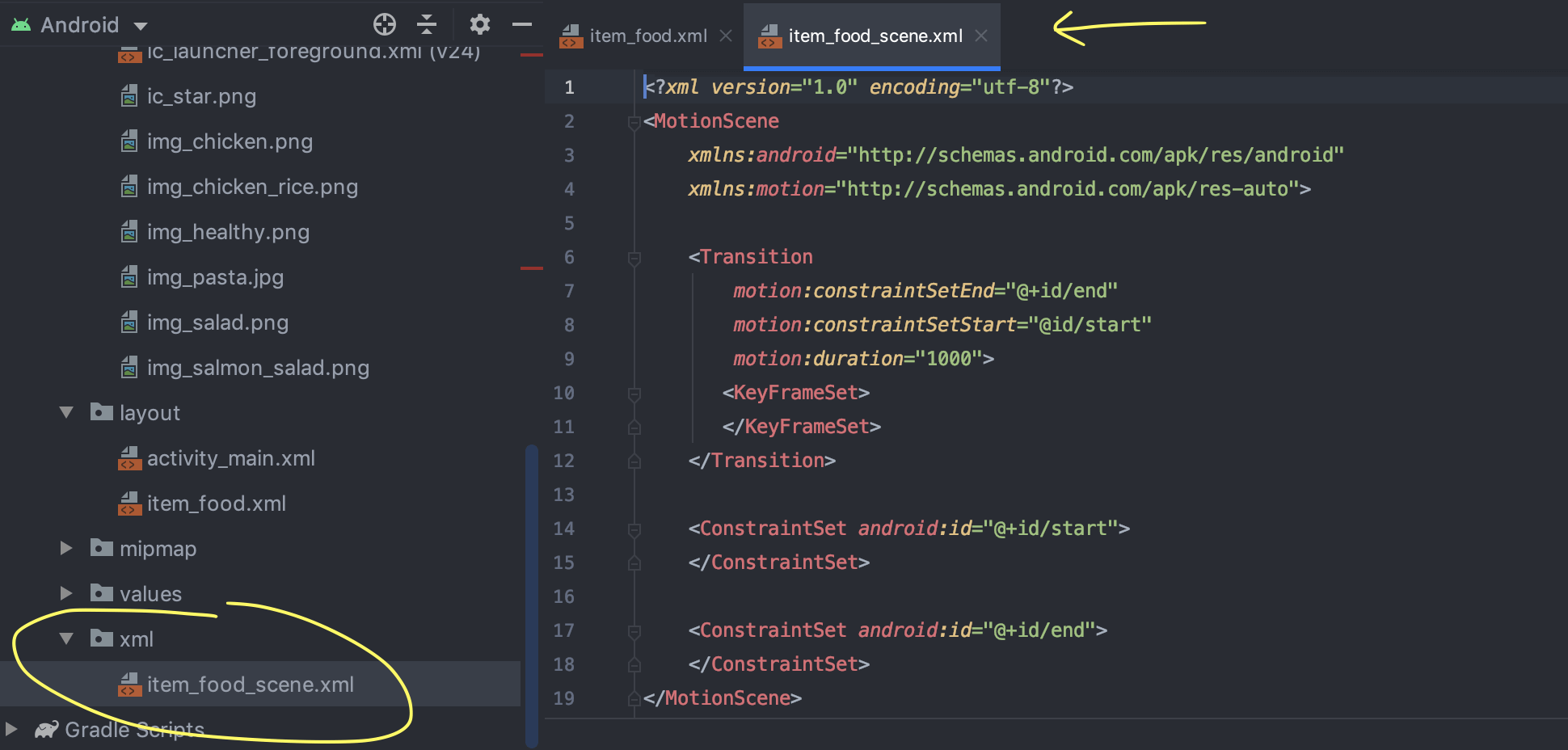
(Warnings ), ImageView contentDescription. , XML- ( , ).
5: ImageView

ivFood (ImageView );
MotionLayout end;
ivFood (End) (End) ;
;
layout_height layout_width 300dp.
: ImageView ( , ) , : ( 150dp 300dp).
6: ,
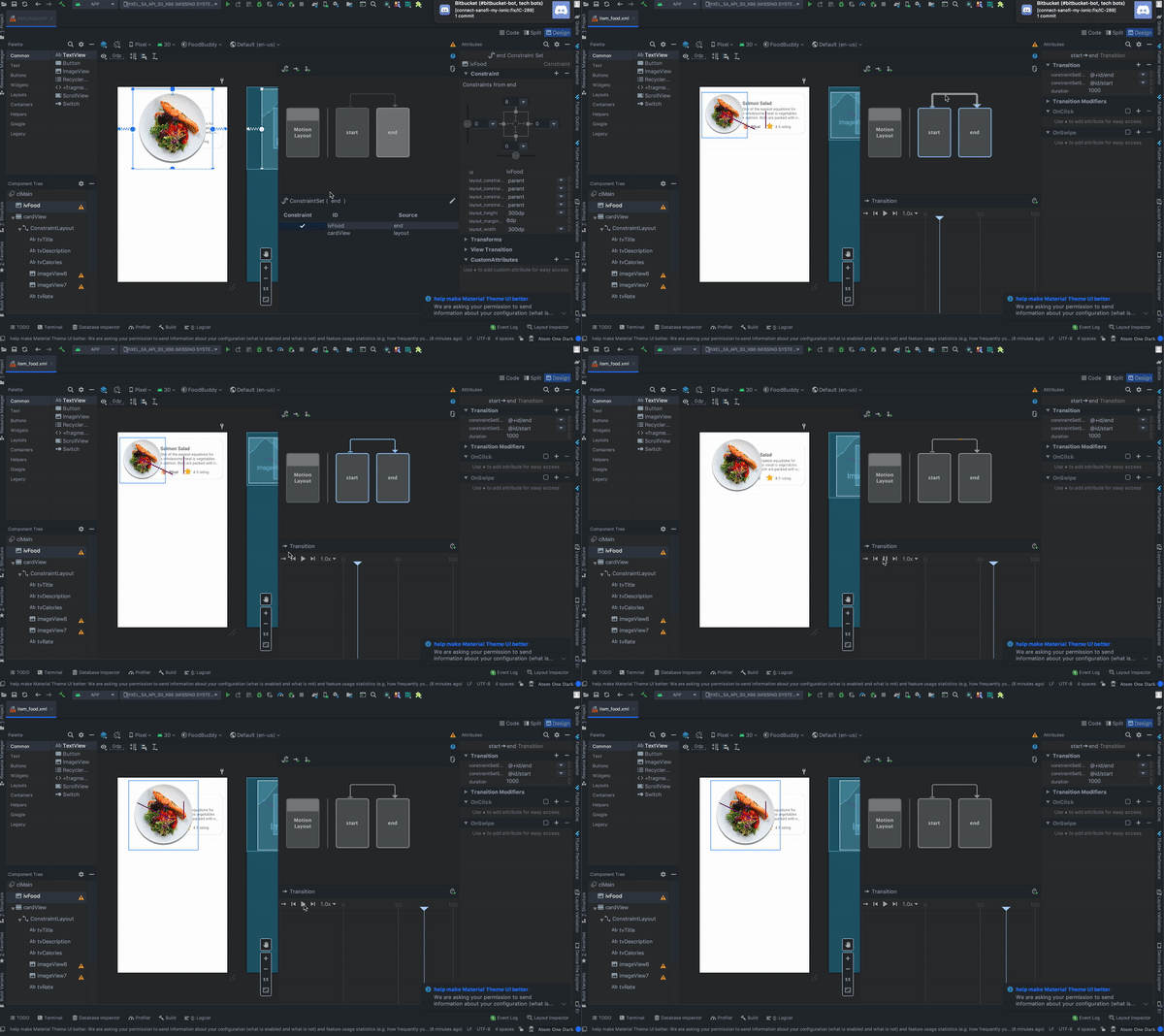
, :
MotionLayout , start end;
Transition;
Play, .
7: CardView
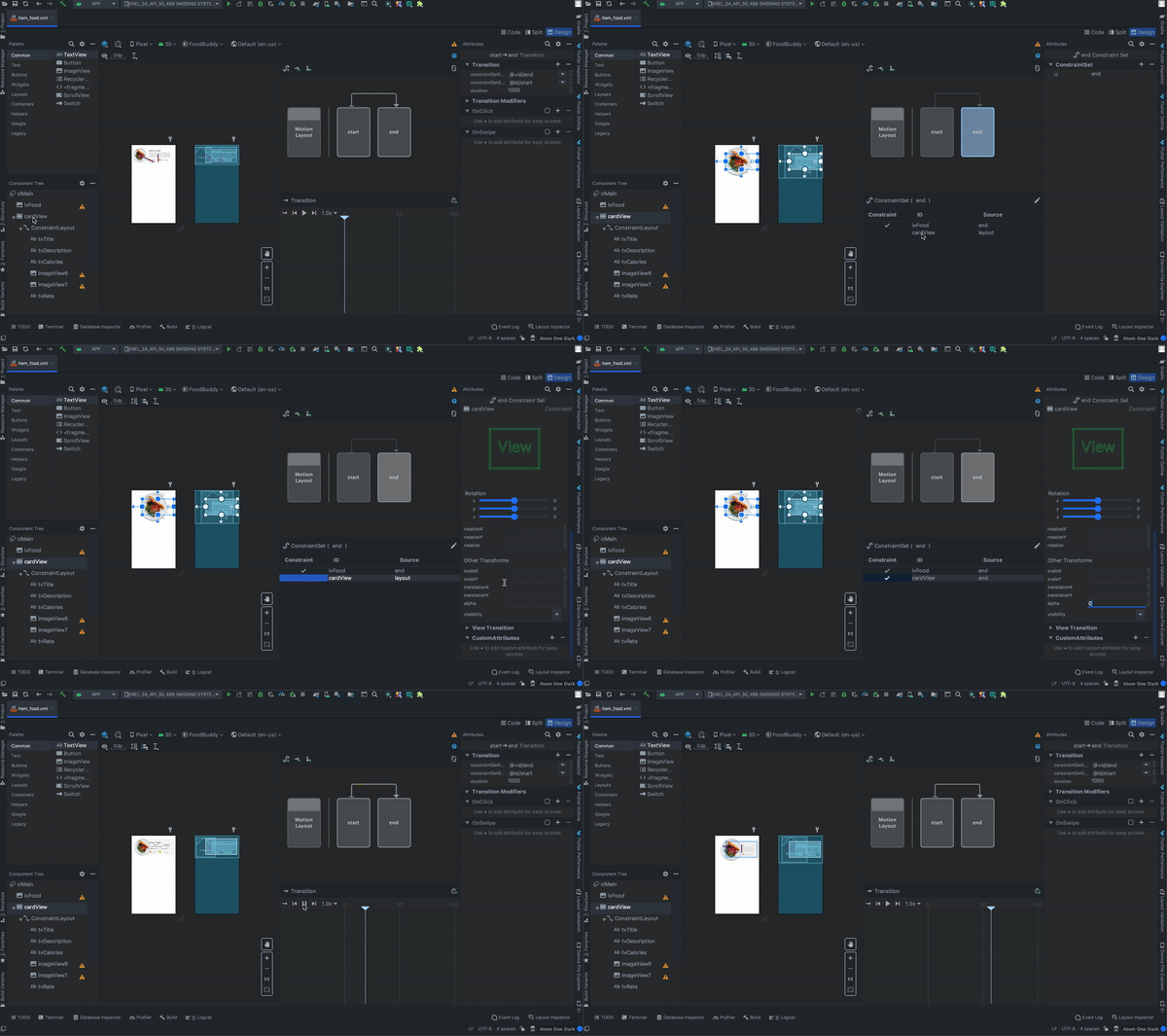
:
cardView (constraintView , , );
MotionLayout end;
cardView ConstraintSet;
Transforms;
alpha 0.
: (end) (start) alpha. ( ).
8:
, :
OnClick ( «+»);
targetId ivFood;
;
ClickAction toggle.
:
9: RecyclerView activity_main.xml
<?xml version="1.0" encoding="utf-8"?>
<androidx.constraintlayout.widget.ConstraintLayout xmlns:android="http://schemas.android.com/apk/res/android"
xmlns:app="http://schemas.android.com/apk/res-auto"
android:layout_width="match_parent"
android:layout_height="match_parent">
<androidx.recyclerview.widget.RecyclerView
android:id="@+id/rvMain"
android:layout_width="match_parent"
android:layout_height="match_parent"
app:layout_constraintBottom_toBottomOf="parent"
app:layout_constraintEnd_toEndOf="parent"
app:layout_constraintStart_toStartOf="parent"
app:layout_constraintTop_toTopOf="parent" />
</androidx.constraintlayout.widget.ConstraintLayout>
10:
package com.mjmanaog.foodbuddy.data.model
import com.mjmanaog.foodbuddy.R
data class FoodModel(
val title: String,
val description: String,
val calories: String,
val rate: String,
val imgId: Int
)
val foodDummyData: ArrayList<FoodModel> = arrayListOf(
FoodModel(
" ",
" — . , : , .",
"80 ",
"4.5",
R.drawable.img_salmon_salad
),
FoodModel(
" -",
" , , .",
"80 ",
"4.5",
R.drawable.img_chicken
),
FoodModel(
" ",
" — . , . .",
"80 ",
"4.5",
R.drawable.img_chicken_rice
),
FoodModel(
" ",
" , ( ), , , , , , , .",
"80 ",
"4.5",
R.drawable.img_salad
),
FoodModel(
" ",
" — . , : , .",
"80 ",
"4.5",
R.drawable.img_healthy
)
)
11: ViewHolder
. FoodModel
12: RecyclerView
class MainActivity : AppCompatActivity() {
private var foodAdapter: FoodAdapter = FoodAdapter()
override fun onCreate(savedInstanceState: Bundle?) {
super.onCreate(savedInstanceState)
setContentView(R.layout.activity_main)
rvMain.layoutManager = LinearLayoutManager(this, RecyclerView.VERTICAL, false)
rvMain.adapter = foodAdapter
foodAdapter.addAll(foodDummyData)
}
}
Als Ergebnis dieser einfachen Aktionen haben wir die folgende Animation erhalten:
Ich habe das GIF aus dem Artikel nicht hinzugefügt, weil
Sie trägt 11 MB.
Etwas anderes
Die Datei item_food_scene.xml enthält eine Beschreibung der von uns konfigurierten Animation. Niemand stört Sie daran, Animationen in Szenendateien manuell zu erstellen und zu bearbeiten.
Ich hoffe, das Material aus diesem Artikel wird jemandem nützlich sein. Es wird cool sein, wenn Sie etwas Neues daraus lernen.
Vielen Dank für Ihre Aufmerksamkeit.