Kivy und Flutter sind zwei Open Source-Frameworks für die plattformübergreifende Entwicklung.
Flattern:
- Erstellt von Google und veröffentlicht im Jahr 2017;
- verwendet Dart als Programmiersprache;
- verwendet keine nativen Komponenten und zeichnet die gesamte Benutzeroberfläche in einer eigenen Grafik-Engine.
Kivy:
- erstellt von der Kivy-Community im Jahr 2010;
- verwendet Python als Programmiersprache und eine eigene deklarative Sprache zum Markieren von UI-Elementen - KV Language;
- verwendet keine nativen Komponenten und zeichnet die gesamte Schnittstelle mit OpenGL ES 2.0 und SDL2.
Kürzlich stieß ich auf den Freiflächen von YouTube auf eine Videodemonstration der Flutter-Anwendung - Facebook Desktop Redesign, das mit Flutter Desktop erstellt wurde . Tolle Demo-Anwendung im Materialdesign-Stil! Und da ich einer der Entwickler der KivyMD- Bibliothek bin (eine Reihe von Materialkomponenten für das Kivy-Framework), habe ich mich gefragt, wie einfach es wäre, eine so schöne Oberfläche zu erstellen. Glücklicherweise hat der Autor einen Link zum Projekt-Repository hinterlassen .


Welche App in den obigen Screenshots wurde Ihrer Meinung nach mit Flutter geschrieben und welche mit Kivy? Es ist schwierig, sofort zu antworten, da es keine ausgeprägten Unterschiede gibt. Das einzige, was sofort auffällt (unterer Screenshot), ist, dass es in Kivy immer noch kein normales Anti-Aliasing gibt. Und das ist traurig, aber nicht kritisch. Wir werden einzelne Elemente der Anwendung und ihren Quellcode in Dart (Flutter) und Python / KV (Kivy) vergleichen.
Nun wollen wir sehen, wie die Komponenten von innen aussehen ...
StoryCard
Kivy
Kartenaufschlag in KV-Sprache:

Basis-Python-Klasse:
from kivy.properties import StringProperty
from kivymd.uix.relativelayout import MDRelativeLayout
class StoryCard(MDRelativeLayout):
avatar = StringProperty()
story = StringProperty()
name = StringProperty()
def on_parent(self, *args):
if not self.avatar:
self.remove_widget(self.ids.avatar)
Flattern:
import 'package:flutter/material.dart';
import 'package:flutter/widgets.dart';
class Story extends StatefulWidget {
final String name;
final String avatar;
final String story;
const Story({
Key key,
this.name,
this.avatar,
this.story,
}) : super(key: key);
@override
_StoryState createState() => _StoryState();
}
class _StoryState extends State<Story> {
@override
Widget build(BuildContext context) {
return Container(
width: 150,
margin: const EdgeInsets.only(top: 30),
decoration: BoxDecoration(
borderRadius: BorderRadius.circular(30),
boxShadow: [
BoxShadow(
color: Colors.black.withOpacity(0.3),
blurRadius: 20,
offset: Offset(0, 10),
),
],
),
child: Stack(
overflow: Overflow.visible,
fit: StackFit.expand,
children: [
ClipRRect(
borderRadius: BorderRadius.circular(30),
child: Image.network(
widget.story,
fit: BoxFit.cover,
),
),
if (widget.avatar != null)
Positioned.fill(
top: -30,
child: Align(
alignment: Alignment.topCenter,
child: Container(
decoration: BoxDecoration(
borderRadius: BorderRadius.circular(30),
boxShadow: [
BoxShadow(
color: Colors.black.withOpacity(0.4),
blurRadius: 5,
offset: Offset(0, 3),
),
],
),
child: ClipRRect(
borderRadius: BorderRadius.circular(30),
child: Image.network(
widget.avatar,
fit: BoxFit.cover,
width: 60,
height: 60,
),
),
),
),
),
if (widget.avatar != null)
Positioned.fill(
child: Align(
alignment: Alignment.bottomCenter,
child: Row(
children: [
Expanded(
child: Container(
padding: const EdgeInsets.all(15),
decoration: BoxDecoration(
borderRadius: BorderRadius.circular(30),
gradient: LinearGradient(
begin: Alignment.topCenter,
end: Alignment.bottomCenter,
colors: [
Colors.transparent,
Colors.black,
],
),
),
child: widget.name != null ? Text(
widget.name,
textAlign: TextAlign.center,
maxLines: 1,
overflow: TextOverflow.ellipsis,
style: TextStyle(
color: Colors.white,
fontWeight: FontWeight.bold,
),
) : SizedBox(),
),
),
],
),
),
),
],
),
);
}
}
Wie Sie sehen können, ist der Code in Python und KV-Language doppelt so kurz. Der in diesem Artikel beschriebene Quellcode für das Python / Kivy-Projekt hat eine Gesamtgröße von 31 Kilobyte. 3 Kilobyte dieser Menge sind Python-Code, der Rest ist KV-Sprache. Der Quellcode für Flutter ist 54 Kilobyte. Es scheint jedoch nichts zu überraschen - Python ist eine der lakonischsten Programmiersprachen der Welt.
Wir werden nicht darüber streiten, was besser ist: die Benutzeroberfläche mit DSL-Sprachen oder direkt im Code zu beschreiben. In Kivy können Sie übrigens auch Python-Widgets mit Code erstellen, aber dies ist keine sehr gute Lösung.
TopBar
Flattern:

Kivy:

Die Implementierung dieser Leiste, einschließlich Animation, in Python / Kivy erforderte nur 88 Codezeilen. Dart / Flutter hat 325 Zeilen und 9 Kilobyte Speicherplatz. Mal sehen, was dieses Widget ist:
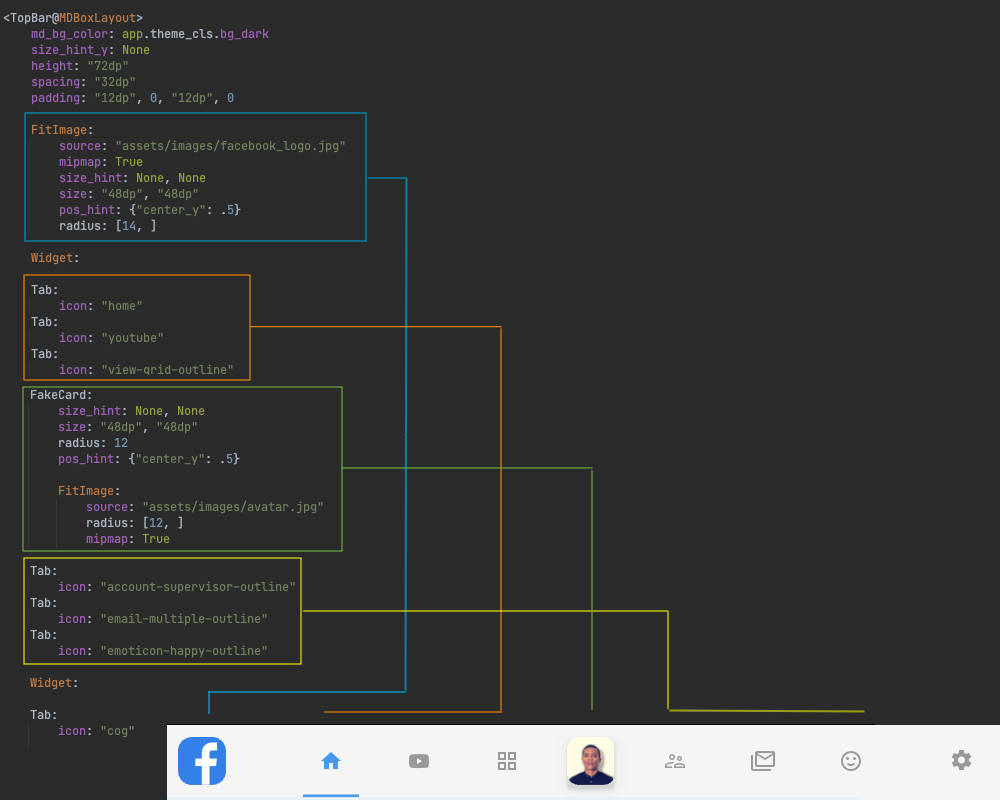
Logo, drei Registerkarten, ein Avatar, drei Registerkarten und eine Registerkarte - die Schaltfläche Einstellungen. Implementierung einer Registerkarte mit animiertem Indikator:

Die Animation des Indikators und das Ändern des Typs des Mauszeigers wird in einer Python-Datei in der gleichnamigen Klasse mit der Markup-Regel implementiert:
from kivy.animation import Animation
from kivy.properties import StringProperty, BooleanProperty
from kivy.core.window import Window
from kivymd.uix.boxlayout import MDBoxLayout
from kivymd.uix.behaviors import FocusBehavior
class Tab(FocusBehavior, MDBoxLayout):
icon = StringProperty()
active = BooleanProperty(False)
def on_enter(self):
Window.set_system_cursor("hand")
def on_leave(self):
Window.set_system_cursor("arrow")
def on_active(self, instance, value):
Animation(
opacity=value,
width=self.width if value else 0,
d=0.25,
t="in_sine" if value else "out_sine",
).start(self.ids.separator)
Wir animieren einfach die Breite und Deckkraft des Indikators in Abhängigkeit vom Status der Schaltfläche (aktiv). Der Status der Schaltfläche wird in der Hauptklasse des Anwendungsbildschirms festgelegt:
class FacebookDesktop(ThemableBehavior, MDScreen):
def set_active_tab(self, instance_tab):
for widget in self.ids.tab_box.children:
if issubclass(widget.__class__, MDBoxLayout):
if widget == instance_tab:
widget.active = True
else:
widget.active = False
Erfahren Sie mehr über Animation in Kivy:
Material Design. Erstellen von Animationen in Kivy
Entwicklung mobiler Anwendungen in Python. Erstellen von Animationen in Kivy. Teil 2
Implementierung in Dart / Flutter.
Da es viel Code gibt, habe ich alles unter Spoilern versteckt:
app_logo.dart
import 'package:flutter/material.dart';
import 'package:flutter/widgets.dart';
class AppLogo extends StatelessWidget {
@override
Widget build(BuildContext context) {
return Container(
decoration: BoxDecoration(
borderRadius: BorderRadius.circular(10),
boxShadow: [
BoxShadow(
color: Colors.blue.withOpacity(.6),
blurRadius: 5,
spreadRadius: 1,
),
],
),
child: ClipRRect(
borderRadius: BorderRadius.circular(10),
child: Image.asset(
'assets/images/facebook_logo.jpg',
width: 30,
height: 30,
),
),
);
}
}
avatar.dart
import 'package:flutter/material.dart';
import 'package:flutter/rendering.dart';
import 'package:flutter/widgets.dart';
class TopBarAvatar extends StatefulWidget {
@override
_TopBarAvatarState createState() => _TopBarAvatarState();
}
class _TopBarAvatarState extends State<TopBarAvatar>
with SingleTickerProviderStateMixin {
Animation<Color> _animation;
AnimationController _animationController;
@override
void initState() {
_animationController = AnimationController(
vsync: this,
duration: Duration(milliseconds: 150),
);
_animation = ColorTween(
begin: Colors.grey.withOpacity(.4),
end: Colors.blue.withOpacity(.6),
).animate(_animationController);
_animation.addListener(() {
setState(() {});
});
super.initState();
}
@override
Widget build(BuildContext context) {
return MouseRegion(
onHover: (event) {
setState(() {
_animationController.forward();
});
},
onExit: (event) {
setState(() {
_animationController.reverse();
});
},
cursor: SystemMouseCursors.click,
child: Padding(
padding: const EdgeInsets.symmetric(horizontal: 15),
child: Container(
decoration: BoxDecoration(
borderRadius: BorderRadius.circular(15),
boxShadow: [
BoxShadow(
color: _animation.value,
blurRadius: 10,
spreadRadius: 0,
),
],
),
child: ClipRRect(
borderRadius: BorderRadius.circular(15),
child: Image.asset(
'assets/images/avatar.jpg',
width: 50,
height: 50,
),
),
),
),
);
}
}
button.dart
import 'package:flutter/material.dart';
import 'package:flutter/rendering.dart';
import 'package:flutter/widgets.dart';
class TopBarButton extends StatefulWidget {
final IconData icon;
final bool isActive;
final Function onTap;
const TopBarButton({
Key key,
this.icon,
this.isActive = false,
this.onTap,
}) : super(key: key);
@override
_TopBarButtonState createState() => _TopBarButtonState();
}
class _TopBarButtonState extends State<TopBarButton>
with SingleTickerProviderStateMixin {
Animation<Color> _animation;
AnimationController _animationController;
@override
void initState() {
_animationController = AnimationController(
vsync: this,
duration: Duration(milliseconds: 150),
);
_animation = ColorTween(
begin: Colors.grey.withOpacity(.6),
end: Colors.blue.withOpacity(.6),
).animate(_animationController);
_animation.addListener(() {
setState(() {});
});
super.initState();
}
@override
void didUpdateWidget(TopBarButton oldWidget) {
if (widget.isActive) {
_animationController.forward();
} else {
_animationController.reverse();
}
super.didUpdateWidget(oldWidget);
}
@override
Widget build(BuildContext context) {
return GestureDetector(
onTap: widget.onTap,
child: MouseRegion(
cursor: SystemMouseCursors.click,
child: Container(
height: 80,
child: Stack(
alignment: Alignment.center,
children: [
Padding(
padding: const EdgeInsets.symmetric(horizontal: 30),
child: Icon(
widget.icon,
color: _animation.value,
),
),
Positioned(
bottom: -1,
child: Align(
alignment: Alignment.bottomCenter,
child: AnimatedContainer(
duration: Duration(milliseconds: 50),
curve: Curves.easeInOut,
decoration: BoxDecoration(
color: _animation.value,
borderRadius: BorderRadius.circular(5),
boxShadow: [
BoxShadow(
color: _animation.value,
blurRadius: 5,
offset: Offset(0, 2),
),
],
),
width: widget.isActive ? 50 : 0,
height: 4,
),
),
),
],
),
),
),
);
}
@override
void dispose() {
_animationController.dispose();
super.dispose();
}
}
widget.dart
import 'package:facebook_desktop/screens/home/components/top_bar/app_logo.dart';
import 'package:facebook_desktop/screens/home/components/top_bar/avatar.dart';
import 'package:facebook_desktop/screens/home/components/top_bar/button.dart';
import 'package:flutter/material.dart';
import 'package:flutter/widgets.dart';
import 'package:flutter_feather_icons/flutter_feather_icons.dart';
class TopBar extends StatefulWidget {
@override
_TopBarState createState() => _TopBarState();
}
class _TopBarState extends State<TopBar> {
int _selectedPage = 0;
@override
Widget build(BuildContext context) {
return Container(
color: Colors.white,
padding: const EdgeInsets.symmetric(
horizontal: 30,
),
child: Row(
children: [
Expanded(
flex: 1,
child: Align(
alignment: Alignment.centerLeft,
child: AppLogo(),
),
),
Expanded(
flex: 6,
child: Row(
mainAxisAlignment: MainAxisAlignment.center,
children: [
TopBarButton(
icon: FeatherIcons.home,
isActive: _selectedPage == 0,
onTap: () {
setState(() {
_selectedPage = 0;
});
},
),
TopBarButton(
icon: FeatherIcons.youtube,
isActive: _selectedPage == 1,
onTap: () {
setState(() {
_selectedPage = 1;
});
},
),
TopBarButton(
icon: FeatherIcons.grid,
isActive: _selectedPage == 2,
onTap: () {
setState(() {
_selectedPage = 2;
});
},
),
TopBarAvatar(),
TopBarButton(
icon: FeatherIcons.users,
isActive: _selectedPage == 3,
onTap: () {
setState(() {
_selectedPage = 3;
});
},
),
TopBarButton(
icon: FeatherIcons.zap,
isActive: _selectedPage == 4,
onTap: () {
setState(() {
_selectedPage = 4;
});
},
),
TopBarButton(
icon: FeatherIcons.smile,
isActive: _selectedPage == 5,
onTap: () {
setState(() {
_selectedPage = 5;
});
},
),
],
),
),
Expanded(
flex: 1,
child: Align(
alignment: Alignment.centerRight,
child: IconButton(
color: Colors.grey.withOpacity(.6),
icon: Icon(FeatherIcons.settings),
onPressed: () {},
),
),
),
],
),
);
}
}
ChatCard (Kivy, Flutter)
|

|
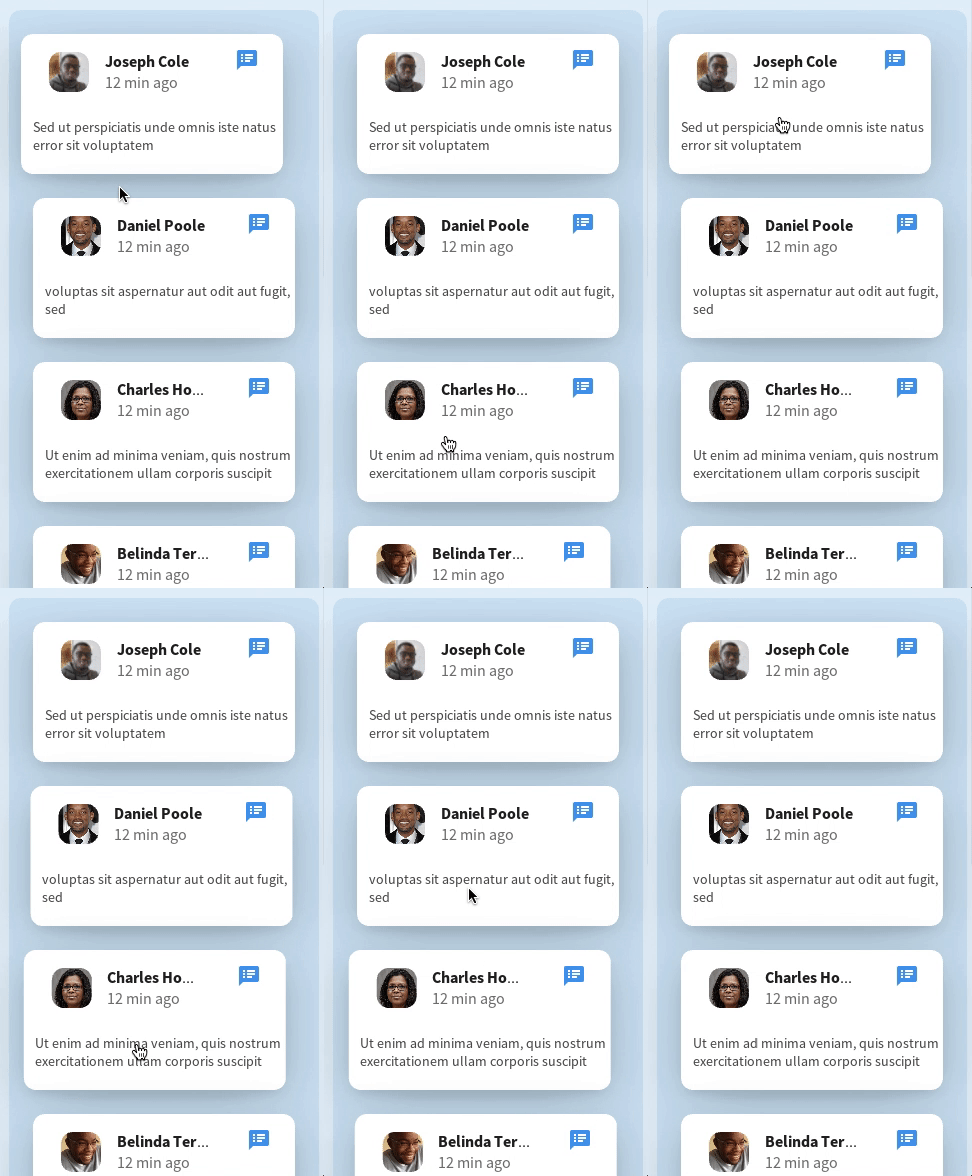
Die Animation der Verschiebung der Karte erfolgt relativ zum übergeordneten Widget (übergeordnetes Element), wenn fokussierte und nicht fokussierte Ereignisse (on_enter, on_leave) empfangen werden:
on_enter: Animation(x=root.parent.x + dp(12), d=0.4, t="out_cubic").start(root)
on_leave: Animation(x=root.parent.x + dp(24), d=0.4, t="out_cubic").start(root)
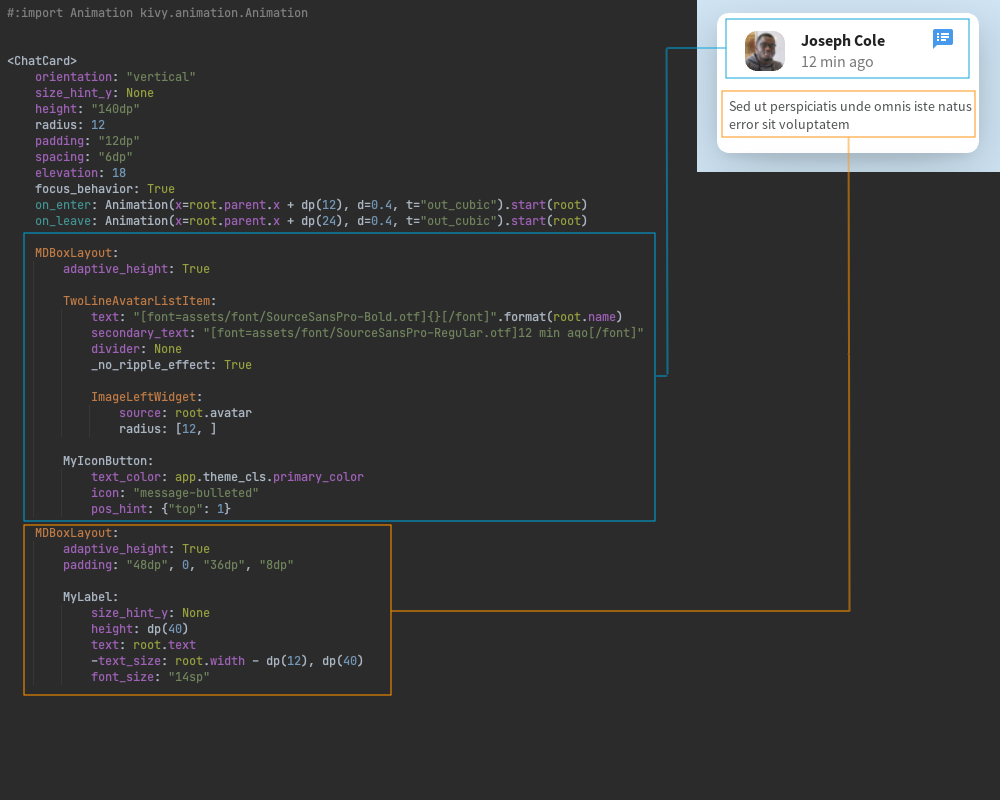
Und die Basis-Python-Klasse:
from kivy.core.window import Window
from kivy.properties import StringProperty
from FacebookDesktop.components.cards.fake_card import FakeCard
class ChatCard(FakeCard):
avatar = StringProperty()
text = StringProperty()
name = StringProperty()
def on_enter(self):
Window.set_system_cursor("hand")
def on_leave(self):
Window.set_system_cursor("arrow")
Python / Kivy-Implementierung - 60 Codezeilen, Dart / Flutter-Implementierung - 182 Codezeilen.
chat_card.dart
import 'package:ezanimation/ezanimation.dart';
import 'package:facebook_desktop/components/user_tile.dart';
import 'package:flutter/material.dart';
import 'package:flutter/rendering.dart';
import 'package:flutter_feather_icons/flutter_feather_icons.dart';
class ChatCard extends StatefulWidget {
final String image;
final String name;
final String message;
final EdgeInsets padding;
const ChatCard({
Key key,
this.image,
this.name,
this.message,
this.padding,
}) : super(key: key);
@override
_ChatCardState createState() => _ChatCardState();
}
class _ChatCardState extends State<ChatCard> {
EzAnimation _animation;
@override
void initState() {
_animation = EzAnimation(
0.0,
-5.0,
Duration(milliseconds: 200),
curve: Curves.easeInOut,
context: context,
);
_animation.addListener(() {
setState(() {});
});
super.initState();
}
@override
Widget build(BuildContext context) {
return Transform.translate(
offset: Offset(_animation.value, 0),
child: MouseRegion(
cursor: SystemMouseCursors.click,
onEnter: (event) {
_animation.start();
},
onExit: (event) {
_animation.reverse();
},
child: Padding(
padding: widget.padding ?? const EdgeInsets.all(15),
child: Container(
width: 250,
padding: const EdgeInsets.all(15),
decoration: BoxDecoration(
color: Colors.white,
borderRadius: BorderRadius.circular(10),
boxShadow: [
BoxShadow(
color: Colors.black.withOpacity(.1),
blurRadius: 15,
offset: Offset(0, 8),
),
],
),
child: Column(
crossAxisAlignment: CrossAxisAlignment.start,
children: [
UserTile(
name: widget.name,
image: widget.image,
trailing: Icon(
FeatherIcons.messageSquare,
color: Colors.blue,
size: 14,
),
),
SizedBox(
height: 10,
),
Text(
widget.message,
style: TextStyle(color: Colors.grey, fontSize: 12),
maxLines: 3,
overflow: TextOverflow.ellipsis,
),
],
),
),
),
),
);
}
@override
void dispose() {
_animation.dispose();
super.dispose();
}
}
user_tile.dart
import 'package:facebook_desktop/screens/home/components/section.dart';
import 'package:flutter/material.dart';
class UserTile extends StatelessWidget {
final String name;
final String image;
final Widget trailing;
const UserTile({
Key key,
this.name,
this.image,
this.trailing,
}) : super(key: key);
@override
Widget build(BuildContext context) {
return Row(
crossAxisAlignment: CrossAxisAlignment.start,
children: [
Container(
margin: const EdgeInsets.only(right: 10),
decoration: BoxDecoration(
color: Colors.white,
borderRadius: BorderRadius.circular(10),
boxShadow: [
BoxShadow(
color: Colors.black.withOpacity(.1),
blurRadius: 5,
offset: Offset(0, 2),
),
],
),
child: ClipRRect(
borderRadius: BorderRadius.circular(5),
child: Image(
image: NetworkImage(
image,
),
fit: BoxFit.cover,
height: 50,
width: 50,
),
),
),
Column(
crossAxisAlignment: CrossAxisAlignment.start,
children: [
SectionTitle(
title: name,
),
SizedBox(
height: 5,
),
Text(
'12 min ago',
style: TextStyle(color: Colors.grey),
),
],
),
if (trailing != null)
Expanded(
child: Align(
alignment: Alignment.topRight,
child: trailing
),
),
],
);
}
}
Aber nicht alles ist so einfach wie es scheint. Dabei stellte ich fest, dass in der KivyMD-Bibliothek Schaltflächen vom Typ "Badge" fehlten. Das Flutter-Projekt verwendete übrigens auch benutzerdefinierte Schaltflächen. Um die richtige Symbolleiste zu erstellen, musste ich solche Schaltflächen selbst erstellen.
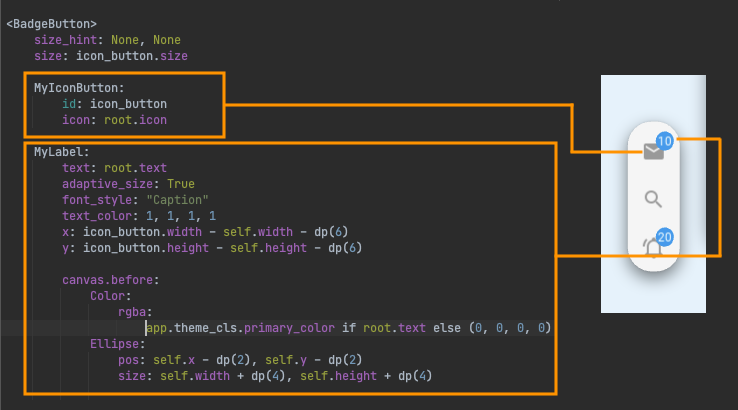
Basis-Python-Klasse:
from kivy.properties import StringProperty
from kivymd.uix.relativelayout import MDRelativeLayout
class BadgeButton(MDRelativeLayout):
icon = StringProperty()
text = StringProperty()
Und bereits die linke Symbolleiste erstellen:

Selbst wenn ich benutzerdefinierte Schaltflächen wie "Badge" erstellen musste, stellte sich heraus, dass der Code der linken Symbolleiste in Python / Kivy kürzer war - 58 Codezeilen, Implementierung in Dart / Flutter - 97 Zeilen .
button.dart
import 'package:flutter/material.dart';
class LeftBarButton extends StatelessWidget {
final IconData icon;
final String badge;
const LeftBarButton({
Key key,
this.icon,
this.badge,
}) : super(key: key);
@override
Widget build(BuildContext context) {
return GestureDetector(
child: Stack(
children: [
Container(
padding: const EdgeInsets.all(10),
child: Icon(
icon,
color: Colors.grey.withOpacity(.6),
),
),
if (badge != null)
Positioned(
top: 5,
right: 2,
child: Container(
padding: const EdgeInsets.all(3),
decoration: BoxDecoration(
borderRadius: BorderRadius.circular(100),
color: Colors.blue,
),
child: Text(
badge,
style: TextStyle(
color: Colors.white,
fontSize: 10,
),
),
),
)
],
),
);
}
}
widget.dart
import 'package:facebook_desktop/screens/home/left_bar/button.dart';
import 'package:flutter/material.dart';
import 'package:flutter/widgets.dart';
import 'package:flutter_feather_icons/flutter_feather_icons.dart';
class LeftBar extends StatelessWidget {
@override
Widget build(BuildContext context) {
return Container(
margin: const EdgeInsets.all(30),
padding: const EdgeInsets.all(5),
decoration: BoxDecoration(
color: Colors.white,
borderRadius: BorderRadius.circular(50),
boxShadow: [
BoxShadow(
color: Colors.grey.withOpacity(.1),
blurRadius: 2,
offset: Offset(0, 4),
)
],
),
child: Column(
mainAxisSize: MainAxisSize.min,
children: [
LeftBarButton(
icon: FeatherIcons.mail,
badge: '10',
),
SizedBox(
height: 5,
),
LeftBarButton(
icon: FeatherIcons.search,
),
SizedBox(
height: 5,
),
LeftBarButton(
icon: FeatherIcons.bell,
badge: '20',
),
],
),
);
}
}
Natürlich werde ich die Vorzüge des Flutter-Frameworks nicht herabsetzen. Das Tool ist wunderbar! Ich wollte Python-Entwicklern nur zeigen, dass sie die gleichen Dinge wie in Flutter tun können, jedoch in ihrer bevorzugten Programmiersprache unter Verwendung des Kivy-Frameworks und der KivyMD-Bibliothek. Bei mobilen Plattformen ist anzumerken, dass Flutter Kivy in Bezug auf Geschwindigkeit übertrifft. Aber das ist ein anderer Artikel ... Link zum Repository des Facebook Desktop Redesign, das mit dem Flutter Desktop- Projekt in der Python / Kivy / KivyMD-Implementierung erstellt wurde.