Im ersten Teil des Artikels haben wir uns mit Shells, Profilen, Synonymen und ersten Befehlen befasst. Unter dem Spoiler habe ich auch erklärt, wie eine virtuelle Testmaschine bereitgestellt wird.
In diesem Teil werden wir über Skriptdateien, ihre Parameter und Zugriffsrechte sprechen. Ich werde auch über bedingte Ausführung, Auswahl und Schleifenanweisungen sprechen.
Skripte
Es ist praktisch, Skripte zu verwenden, um mehrere Befehle in einem Aufruf auszuführen. Ein Skript ist eine Textdatei, die Shell-Befehle enthält. Dies können sowohl interne Shell-Befehle als auch Aufrufe externer ausführbarer Dateien sein.
In der Regel endet der Name der Skriptdatei mit .sh. Dies ist jedoch keine zwingende Voraussetzung und wird nur verwendet, um dem Benutzer die Navigation anhand des Dateinamens zu erleichtern. Für den Interpreter sind der Inhalt der Datei sowie die Zugriffsrechte darauf wichtiger.
Gehen wir mit dem Befehl zum Ausgangsverzeichnis cd ~
und erstellen mit dem nano ( nano script.sh
) -Editor eine Datei, die zwei Zeilen enthält:
#!/bin/bash
echo Hello!
Um den Nano-Editor nach der Eingabe des Skripts zu verlassen, müssen Sie Strg + X drücken und dann zur Frage "Geänderten Puffer speichern?" Drücken Sie Y und dann bei der Anforderung "Zu schreibender Dateiname:" die Eingabetaste. Sie können jeden anderen Texteditor verwenden, wenn Sie möchten.
./<_>
, .. ./
, , . script.sh
, , .. , PATH, (, , , pwd):
test@osboxes:~$ script.sh
script.sh: command not found
, , : /home/user/script.sh
. :
test@osboxes:~$ ./script.sh
-bash: ./script.sh: Permission denied
:
test@osboxes:~$ ls -l script.sh
-rw-rw-r-- 1 test test 22 Nov 9 05:27 script.sh
ls
, . :

: , ; , ; . r, w x , .
(test) , , – . , , umask -S
. , umask ( ~/.profile), ( /etc/profile).
, , chmod <> <_>
. , , :
test@osboxes:~$ chmod a+x script.sh
:
test@osboxes:~$ chmod ug+rx script.sh
( ) :
test@osboxes:~$ chmod a-w script.sh
. , , , , , – , :
test@osboxes:~$ chmod 754 script.sh
-rwxr-xr--
:
test@osboxes:~$ ls -la script.sh
-rwxr-xr-- 1 test test 22 Nov 9 05:27 script.sh
3 , . , , . :
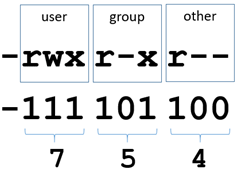
–
(–
, d
– , l
– , c
– , b
– , . .). , :
|
|
|
|
0 |
000 |
|
1 |
001 |
(x) |
2 |
010 |
(w) |
3 |
011 |
(wx) |
4 |
100 |
(r) |
5 |
101 |
(rx) |
6 |
110 |
(rw) |
7 |
111 |
, (rwx) |
, :
test@osboxes:~$ ./script.sh
Hello!
#!/bin/bash
. #!
́ (. shebang) , . , .
#!/bin/sh
. , , /bin/sh shell, /bin/sh /bin/dash, . echo Hello!
, .
, , . : <_> <1> <2> …
, ./script1.sh Moscow Russia
.
, , $1
, - $2
, .. , :
$0
–
$#
–
$$
– PID() ,
$?
–
script1.sh :
#!/bin/bash
echo Hello, $USER!
printf "Specified City is: %s, Country is: %s\n" $1 $2
:
test@osboxes:~$ chmod u+x script1.sh
test@osboxes:~$ ./script1.sh Moscow Russia
Hello, test!
Specified City is: Moscow, Country is: Russia
2 , , , , printf. Hello USER.
, , ( ), :
test@osboxes:~$ ./script1.sh "San Francisco" "United States"
Hello, test!
Specified City is: San Francisco, Country is: United States
, printf :
printf "Specified City is: %s, Country is: %s\n" "$1" "$2"
, $. , :
COUNTRY=RUSSIA
echo $COUNTRY
,
, , bash – . , – . .
:
if [ <> ]
then
<1>
else
<2>
fi
, (, ), (.. ) 8 :
#!/bin/bash
echo Hello, $USER!
echo -n "Enter string: "
read str
if [ ${#str} -lt 8 ]
then
echo String is too short
else
echo String is ok
fi
2 , 5 8 :
test@osboxes:~$ ./script2.sh
Hello, test!
Enter string: abcde
String is too short
test@osboxes:~$ ./script2.sh
Hello, test!
Enter string: abcdefgh
String is ok
read str
, str. ${#str}
str 8. , 8 (-lt 8
), «String is too short», – «String is ok».
, , , 8 16 , [ ${#str} -lt 8 ] || [ ${#str} -gt 16 ]
. ||
"", "" bash &&
.
:
#!/bin/bash
echo Hello, $USER!
echo -n "Enter string: "
read str
if [ ${#str} -lt 8 ]
then
echo String is too short
else
if [ ${#str} -gt 16 ]
then
echo String is too long
else
echo String is ok
fi
fi
, 8 , , "String is too short", . ( 8 ) - ( else) , 16 . - "String is too long", ( else) - "String is ok".
:
test@osboxes:~$ ./script2.sh
Hello, test!
Enter string: abcdef
String is too short
test@osboxes:~$ ./script2.sh
Hello, test!
Enter string: abcdefghijklmnopqrstuv
String is too long
test@osboxes:~$ ./script2.sh
Hello, test!
Enter string: abcdefghijkl
String is ok
:
case "$" in
"$1" )
<1>;;
"$2" )
<2>;;
esac
, :
#!/bin/bash
echo -n "Enter the name of planet: "
read PLANET
echo -n "The $PLANET has "
case $PLANET in
Mercury | Venus ) echo -n "no";;
Earth ) echo -n "one";;
Mars ) echo -n "two";;
Jupiter ) echo -n "79";;
*) echo -n "an unknown number of";;
esac
echo " satellite(s)."
:
test@osboxes:~$ ./script3.sh
Enter the name of planet: Mercury
The Mercury has no satellite(s).
test@osboxes:~$ ./script3.sh
Enter the name of planet: Venus
The Venus has no satellite(s).
test@osboxes:~$ ./script3.sh
Enter the name of planet: Earth
The Earth has one satellite(s).
test@osboxes:~$ ./script3.sh
Enter the name of planet: Mars
The Mars has two satellite(s).
test@osboxes:~$ ./script3.sh
Enter the name of planet: Jupiter
The Jupiter has 79 satellite(s).
test@osboxes:~$ ./script3.sh
Enter the name of planet: Alpha555
The Alpha555 has an unknown number of satellite(s).
.
case Mercury | Venus
, |
"" ( if, ||
), "no" , . case []
. , :
#!/bin/bash
echo -n "Enter key: "
read -n 1 key
echo
case "$key" in
[a-z] ) echo "Lowercase";;
[A-Z] ) echo "Uppercase";;
[0-9] ) echo "Digit";;
* ) echo "Something else";;
esac
( , , , ). :
test@osboxes:~$ ./a.sh
Enter key: t
Lowercase
test@osboxes:~$ ./a.sh
Enter key: P
Uppercase
test@osboxes:~$ ./a.sh
Enter key: 5
Digit
test@osboxes:~$ ./a.sh
Enter key: @
Something else
:
( ):
for [ <> ] do <> done
, :
while [ <> ] do <> done
, :
until [ <> ] do <> done
while , EXIT
#!/bin/bash
PLANET="-"
while [ $PLANET != "EXIT" ]
do
echo -n "Enter the name of planet: "
read PLANET
if [ $PLANET != "EXIT" ]
then.
echo -n "The $PLANET has "
case $PLANET in
Mercury | Venus ) echo -n "no";;
Earth ) echo -n "one";;
Mars ) echo -n "two";;
Jupiter ) echo -n "79";;
*) echo -n "an unknown number of";;
esac
echo " satellite(s)."
fi
done
, , EXIT. , , EXIT:
test@osboxes:~$ ./script4.sh
Enter the name of planet: Earth
The Earth has one satellite(s).
Enter the name of planet: Jupiter
The Jupiter has 79 satellite(s).
Enter the name of planet: Planet123
The Planet123 has an unknown number of satellite(s).
Enter the name of planet: EXIT
, while [ $PLANET != "EXIT" ]
until [ $PLANET == "EXIT" ]
. ==
"", !=
" ".
:
#!/bin/bash
rm *.dat
echo -n "File count: "
read count
for (( i=1; i<=$count; i++ ))
do
head -c ${i}M </dev/urandom >myfile${i}mb.dat
done
ls -l *.dat
echo -n "Delete file greater than (mb): "
read maxsize
for f in *.dat
do
size=$(( $(stat -c %s $f) /1024/1024))
if [ $size -gt $maxsize ]
then.
rm $f
echo Deleted file $f
fi
done
ls -l *.dat
read
, (read count
).
(for (( i=1; i<=$count; i++ ))
) , count, . head
, /dev/random, .
<
(/dev/urandom) head
.
>
( head -c ${i}M
) , (myfile${i}mb.dat
).
, .
(for f in *.dat
) .dat , . , , .
.dat, (ls -l *.dat
). :
test@osboxes:~$ ./script5.sh
File count: 10
-rw-rw-r-- 1 test test 10485760 Nov 9 08:48 myfile10mb.dat
-rw-rw-r-- 1 test test 1048576 Nov 9 08:48 myfile1mb.dat
-rw-rw-r-- 1 test test 2097152 Nov 9 08:48 myfile2mb.dat
-rw-rw-r-- 1 test test 3145728 Nov 9 08:48 myfile3mb.dat
-rw-rw-r-- 1 test test 4194304 Nov 9 08:48 myfile4mb.dat
-rw-rw-r-- 1 test test 5242880 Nov 9 08:48 myfile5mb.dat
-rw-rw-r-- 1 test test 6291456 Nov 9 08:48 myfile6mb.dat
-rw-rw-r-- 1 test test 7340032 Nov 9 08:48 myfile7mb.dat
-rw-rw-r-- 1 test test 8388608 Nov 9 08:48 myfile8mb.dat
-rw-rw-r-- 1 test test 9437184 Nov 9 08:48 myfile9mb.dat
Delete file greater than (mb): 5
Deleted file myfile10mb.dat
Deleted file myfile6mb.dat
Deleted file myfile7mb.dat
Deleted file myfile8mb.dat
Deleted file myfile9mb.dat
-rw-rw-r-- 1 test test 1048576 Nov 9 08:48 myfile1mb.dat
-rw-rw-r-- 1 test test 2097152 Nov 9 08:48 myfile2mb.dat
-rw-rw-r-- 1 test test 3145728 Nov 9 08:48 myfile3mb.dat
-rw-rw-r-- 1 test test 4194304 Nov 9 08:48 myfile4mb.dat
-rw-rw-r-- 1 test test 5242880 Nov 9 08:48 myfile5mb.dat
10 (myfile1mb.dat .. myfile10mb.dat) 1 10 .dat 5 . (Deleted file myfile10mb.dat
). (myfile1mb.dat .. myfile5mb.dat).
, cron, .