Inhaltsverzeichnis
Berechnung des Filmmaterials und des Produktionsbereichs (einige Matrizen)
Kosten
Daten mit PyODBC sichern
Hochladen von Daten mit MsSQL Library SL
Berechnung des Filmmaterials und des Produktionsbereichs (einige Matrizen)
Die Matrix des Filmmaterials der hergestellten Produkte nach Profilen und Formaten ist eine zweidimensionale Anordnung A 6 * 6, die in eine zweidimensionale Anordnung B p * f unterteilt ist, wobei p = 5 das Wellenprofil ist, f = 5 ist das Format und eindimensionales Z p ist die Summe der produzierten Zähler durch Wellenprofile und Z f - die Summe der produzierten Zähler durch Formate. Dementsprechend ist die Matrix Zp eine eindimensionale Matrix von 5 Elementen, es ist die Summe der Spalten der Matrix A, Zf ist eine eindimensionale Matrix von 5 Elementen, es ist die Summe der Zeilen der Matrix A. Produkte.
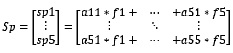
Es wurden auch zwei weitere eindimensionale Matrizen benötigt: Sp - der Bereich der durch Profile hergestellten Produkte und Sf - der Bereich der durch Formate hergestellten Produkte und eine konstante Matrix F - eine eindimensionale Matrix mit 5 Elementen - eine Liste von Rohstoffformaten.


Mit dem Füllen umgehen! Jetzt beginnt die Algebra.
Die Summe für Formate und Profile wird berechnet, indem die Zeilen bzw. Spalten der ursprünglichen Matrix A addiert werden.
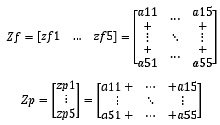
Die Berechnung der Flächen nach Format ist sehr einfach, wir multiplizieren einfach 2 Matrizen A und F.

oder

Fläche nach Wellenprofilen:
Funktionsblockliste
FUNCTION_BLOCK Format_math
VAR_INPUT
EN:BOOL;
imp:BOOL;
END_VAR
VAR_INPUT RETAIN
f:INT := 1;
p:INT := 1;
END_VAR
VAR_INPUT
l_roll:REAL;
k_imp:INT;
res:BOOL;
res_month:BOOL;
END_VAR
VAR_OUTPUT
// [f,p], f=6 - , p=6 -
length_f:ARRAY[1..6, 1..6] OF REAL;
wS_f:ARRAY [1..5] OF WORD;
wS_p:ARRAY [1..5] OF WORD;
END_VAR
VAR_OUTPUT RETAIN
S_f:ARRAY [1..5] OF REAL;
S_p:ARRAY [1..5] OF REAL;
END_VAR
VAR_OUTPUT
S_f_month:ARRAY [1..5] OF REAL;
S_p_month:ARRAY [1..5] OF REAL;
END_VAR
VAR
imp_old:BOOL;
f_b: ARRAY [1..5] OF BOOL;
p_b: ARRAY [1..5] OF BOOL;
length_f_old:ARRAY[1..6, 1..6] OF REAL;
i:BYTE;
j: BYTE;
k:REAL;
END_VAR
BEGIN
k:=l_roll/(k_imp*1000);
IF EN AND not imp AND imp_old THEN
length_f[f,p]:=length_f[f,p]+k;
//length_p[p]:=length_p[p]+(l_roll/(k_imp*1000));
END_IF
FOR i:=1 TO 5 DO
length_f[i,6]:=0;
length_f[6,i]:=0;
FOR j:=1 TO 5 DO
length_f[i,6]:=length_f[i,6]+length_f[i,j];
length_f[6,i]:=length_f[6,i]+length_f[j,i];
END_FOR
END_FOR
CASE f OF
1: S_f[f]:=length_f[f,6]*1.050/1000;
2: S_f[f]:=length_f[f,6]*1.250/1000;
3: S_f[f]:=length_f[f,6]*1.400/1000;
4: S_f[f]:=length_f[f,6]*1.575/1000;
5: S_f[f]:=length_f[f,6]*1.600/1000;
END_CASE
FOR i:=1 TO 5 DO
S_p[i]:=length_f[1,i]*1.05/1000+length_f[2,i]*1.25/1000+length_f[3,i]*1.4/1000+length_f[4,i]*1.575/1000+length_f[5,i]*1.6/1000;
wS_p[i]:=REAL_TO_WORD(S_p[i]*10);
wS_f[i]:=REAL_TO_WORD(S_f[i]*10);
END_FOR
IF res THEN
FOR i:=1 TO 6 DO
FOR j:=1 TO 6 DO
length_f_old[i,j]:=length_f[i,j];
length_f[i,j]:=0;
END_FOR
END_FOR
FOR i:=1 TO 5 DO
S_f_month[i]:=S_f_month[i]+S_f[i];
S_f[i]:=0;
S_p_month[i]:=S_p_month[i]+S_p[i];
S_p[i]:=0;
END_FOR
END_IF
IF res_month THEN
FOR i:=1 TO 5 DO
S_f_month[i]:=0;
S_p_month[i]:=0;
END_FOR
END_IF
FOR i:=1 TO 5 DO f_b[i]:=0; END_FOR
FOR i:=1 TO 5 DO p_b[i]:=0; END_FOR
f_b[f]:=TRUE;
p_b[p]:=TRUE;
imp_old:=imp;
END
Kosten
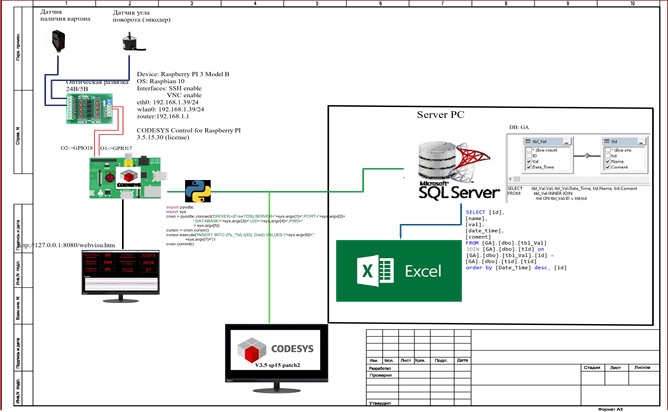
RPI 3 Modell B für 4 Tausend Rubel (auf AliExpress 3 Tausend Rubel). Es war möglich, mit einem günstigeren RPI von Null (2.000 Rubel) auszukommen, aber der Rahmen des Systems wurde anfangs durch die nicht vorhandene TK verwischt (lassen Sie uns dies zuerst tun, und dann werden wir sehen, ob wir etwas anderes brauchen. .. dann ... und dann ...);
24/5 AliExpress 300 . ( );
CODESYS Control for Raspberry Pi SL 50 . - RealTime 2 , ;
PyODBC
ODBC Raspberry
:
pi@raspberrypi:~ $ sudo apt-get install python3-dev unixodbc-dev git
pi@raspberrypi:~ $ git clone https://github.com/mkleehammer/pyodbc
pi@raspberrypi:~ $ cd pythodbc
pi@raspberrypi:~ $ import pyodbc
pi@raspberrypi:~ $ python3 setup.py
pi@raspberrypi:~ $ cd /home/pi/pyodbc
pi@raspberrypi:~ $ sudo python3 setup.py build
pi@raspberrypi:~ $ sudo apt-get update
pi@raspberrypi:~ $ sudo apt-get install g++
pi@raspberrypi:~ $ sudo apt-get install unixodbc-dev
pi@raspberrypi:~ $ pip install pyodbc
pi@raspberrypi:~ $ odbcinst -j
pi@raspberrypi:~ $ cat /etc/odbcinst.ini
[FreeTDS]
Description=FreeTDS Driver v0.91
Driver=/usr/lib/arm-linux-gnueabihf/odbc/libtdsodbc.so
Setup=/usr/lib/arm-linux-gnueabihf/odbc/libtdsS.so
fileusage=1
dontdlclose=1
UsageCount=1
pi@raspberrypi:~ $ cat /etc/odbc.ini
Driver = FreeTDS
Description = My Test Server
Trace = No
ServerName = mssql
#Port = port
instance = MSSQLSERVER #(whatever is the service u r runningcould be SQLEXPRESS)
Database = database_name
TDS_Version = 4.2
pi@raspberrypi:~ $ sudo nano /etc/freetds/freetds.conf
[egServer70]
host = ntmachine.domain.com
port = 1433
tds version = 7.0
[mssql]
host = server_ip_adress
instance = MSSQLSERVER
#Port = port
tds version = 4.2
.
pi@raspberrypi:~ $ sudo python3
>>> server = '192.168.1.2'
>>> port = '1433'
>>> database = 'GA'
>>> username = 'plc'
>>> password = '123456'
>>> cnxn = pyodbc.connect('DRIVER={FreeTDS};SERVER='+server+';PORT='+port+';DATABASE='+database+';UID='+username+';PWD='+ password)
>>> cursor = cnxn.cursor()
>>> cursor.execute('select top 10 ID,Val,Date_Time from tbl_Val')
#cursor.execute('INSERT INTO tbl_Val (ID, Val) VALUES (15, 20)')
>>> rows=cursor.fetchall()
>>> for row in rows: print(row.ID, row.Val)
/home/pi/pyodbc/ “query.py”. , .
import pyodbc
import sys
cnxn = pyodbc.connect('DRIVER={FreeTDS};SERVER='+sys.argv[1]+';PORT='+sys.argv[2]+
';DATABASE='+sys.argv[3]+';UID='+sys.argv[4]+';PWD='
+ sys.argv[5])
cursor = cnxn.cursor()
cursor.execute('INSERT INTO [Py_Tbl] ([ID], [Val]) VALUES ('+sys.argv[6]+','
+sys.argv[7]+')')
cnxn.commit()
5 2 , :
IP ;
( MSSQL 1433);
;
;
;
ID ;
.
SQL_Insert
FUNCTION_BLOCK SQL_Insert
VAR_INPUT
xExecuteScript: BOOL;
Server:STRING := '192.168.1.2';
PORT:INT := 1433;
DB_Name:STRING := 'GA';
login:STRING := 'plc';
password:STRING := '123456';
ID: INT;
Val: REAL;
END_VAR
VAR
pResult: POINTER TO SysProcess.SysTypes.RTS_IEC_RESULT;
Text: string;
END_VAR
BEGIN
IF xExecuteScript THEN
text:='sudo python /home/pi/pyodbc/query.py ';
text:=concat(text,Server);
text:=concat(text,' ');
text:=concat(text,INT_TO_STRING(Port));
text:=concat(text,' ');
text:=concat(text,DB_Name);
text:=concat(text,' ');
text:=concat(text,login);
text:=concat(text,' ');
text:=concat(text,password);
text:=concat(text,' ');
text:=concat(text,INT_TO_STRING(id));
text:=concat(text,' ');
text:=concat(text,REAL_TO_STRING(Val));
SysProcess.SysProcessExecuteCommand(text,pResult);
xExecuteScript:=FALSE;
END_IF
END
query.py . :
pi@raspberrypi:~ $ sudo python /home/pi/pyodbc/query.py server port DB_name login pass id Value
DB_send , ID 10 integer Val 10 real.
FUNCTION_BLOCK DB_Send
VAR_INPUT
id:ARRAY[1..10] OF INT;
val:ARRAY[1..10] OF REAL;
Time_send:TIME :=T#60S;
END_VAR
VAR
SQL_Ins: SQL_Insert;
TONInst: TON;
i: int;
END_VAR
BEGIN
TONInst(IN := NOT(TONInst.Q), PT:= Time_send);
IF TONinst.Q THEN
FOR i:=1 TO 10 DO
IF id[i]<>0 THEN
sql_ins(xExecuteScript:=true, ID:=id[i], val:=val[i]);
END_IF
END_FOR
END_IF
END
? DB_Send , , ID->Val SQL_Inset Python . pyodbc.connect cursor.execute SQL- INSERT… .
MsSQL Library SL

3S-Smart Software Solutions GmbH MsSQL Library SL – (200€) , MsSQL OPC-. TDS . - 2 , , , , 2 , , PyODBC.
:
SELECT
INSERT
UPDATE
DELETE
Execute Stored procedures
5 SQL IEC:
BOOL
DINT
REAL
STRING
DATETIME
4- :
fbMsSQL_compact
fbMsSQL für die Datenbankkommunikation
fbPing, um die Verfügbarkeit eines Remote-Hosts zu überprüfen
fbFIFOQuery, um im Laufe der Zeit mehr SQL-Abfragen zu verarbeiten
Hat 4 Standard-Rendering-Vorlagen
Anmeldedaten
Anmeldeverfahren
Abfragefenster
Antwortfenster
Laden Sie das Paket von store.codesys.com herunter und installieren Sie es. Nach der Installation des MsSQL Library SL-Pakets im Zielverzeichnis .. \ CODESYS MsSQL SL Library \ V1.4.0.5 \ Examples \ Raspberry Pi wird ein anschauliches Beispiel für die Verwendung der Bibliothek entpackt.
Die Seite zum Herstellen einer Verbindung zur Datenbank und zum Anzeigen von Daten.
