Das erste, was der Benutzer sieht, ist die Benutzeroberfläche der Anwendung. In der mobilen Entwicklung hängen die meisten Herausforderungen mit der Konstruktion zusammen, und die meiste Zeit verbringt der Entwickler mit dem Käsekuchen- Layout und der Logik der Präsentationsschicht. Es gibt weltweit viele Ansätze zur Lösung dieser Probleme. Einiges von dem, was wir behandeln werden, wird wahrscheinlich bereits in der Branche verwendet. Aber wir haben versucht, einige davon zusammenzustellen, und wir sind sicher, dass es für Sie nützlich sein wird.
Zu Beginn des Projekts wollten wir zu einem solchen Prozess der Entwicklung von Funktionen kommen, um so wenig Änderungen wie möglich am Code vorzunehmen und gleichzeitig die Wünsche der Designer maximal zu erfüllen sowie eine breite Palette von Werkzeugen und Abstraktionen für den Umgang mit dem Boilerplate zur Hand zu haben.
Dieser Artikel ist nützlich für diejenigen, die weniger Zeit mit routinemäßigen Layoutprozessen und sich wiederholender Logik für die Verarbeitung von Bildschirmzuständen verbringen möchten.
Deklarativer UI-Stil
Modifikatoren oder Dekorateure anzeigen
Mit Beginn der Entwicklung haben wir uns entschlossen, die Konstruktion von UI-Komponenten so flexibel wie möglich zu gestalten und direkt vor Ort aus fertigen Teilen etwas zusammenzusetzen.
Zu diesem Zweck haben wir uns für Dekoratoren entschieden: Sie entsprechen unserer Vorstellung von Einfachheit und Wiederverwendbarkeit von Code.
Dekorateure sind eine Abschlussstruktur, die die Funktionalität der Ansicht erweitert, ohne dass eine Vererbung erforderlich ist.
public struct ViewDecorator<View: UIView> {
let decoration: (View) -> Void
func decorate(_ view: View) {
decoration(view)
}
}
public protocol DecoratableView: UIView {}
extension DecoratableView {
public init(decorator: ViewDecorator<Self>) {
self.init(frame: .zero)
decorate(with: decorator)
}
@discardableResult
public func decorated(with decorator: ViewDecorator<Self>) -> Self {
decorate(with: decorator)
return self
}
public func decorate(with decorator: ViewDecorator<Self>) {
decorator.decorate(self)
currentDecorators.append(decorator)
}
public func redecorate() {
currentDecorators.forEach {
$0.decorate(self)
}
}
}
Warum wir keine Unterklassen verwendet haben:
Sie sind schwer zu verketten;
Es gibt keine Möglichkeit, die Funktionalität der übergeordneten Klasse zu löschen.
Sollte getrennt vom Verwendungskontext beschrieben werden (in einer separaten Datei)
UI .
.
static var headline2: ViewDecorator<View> {
ViewDecorator<View> {
$0.decorated(with: .font(.f2))
$0.decorated(with: .textColor(.c1))
}
}
, .
private let titleLabel = UILabel()
.decorated(with: .headline2)
.decorated(with: .multiline)
.decorated(with: .alignment(.center))
, , .
.
:
private let fancyLabel = UILabel(
decorator: .text("?? ???? ???"))
.decorated(with: .cellTitle)
.decorated(with: .alignment(.center))
:
private let fancyLabel: UILabel = {
let label = UILabel()
label.text = "???? ? ????"
label.numberOfLines = 0
label.font = .f4
label.textColor = .c1
label.textAlignment = .center
return label
}()
— 9 4. .
navigation bar , :
navigationController.navigationBar .decorated(with: .titleColor(.purple)) .decorated(with: .transparent)
:
static func titleColor(_ color: UIColor) -> ViewDecorator<UINavigationBar> {
ViewDecorator<UINavigationBar> {
let titleTextAttributes: [NSAttributedString.Key: Any] = [
.font: UIFont.f3,
.foregroundColor: color
]
let largeTitleTextAttributes: [NSAttributedString.Key: Any] = [
.font: UIFont.f1,
.foregroundColor: color
]
if #available(iOS 13, *) {
$0.modifyAppearance {
$0.titleTextAttributes = titleTextAttributes
$0.largeTitleTextAttributes = largeTitleTextAttributes
}
} else {
$0.titleTextAttributes = titleTextAttributes
$0.largeTitleTextAttributes = largeTitleTextAttributes
}
}
}
static var transparent: ViewDecorator<UINavigationBar> {
ViewDecorator<UINavigationBar> {
if #available(iOS 13, *) {
$0.isTranslucent = true
$0.modifyAppearance {
$0.configureWithTransparentBackground()
$0.backgroundColor = .clear
$0.backgroundImage = UIImage()
}
} else {
$0.setBackgroundImage(UIImage(), for: .default)
$0.shadowImage = UIImage()
$0.isTranslucent = true
$0.backgroundColor = .clear
}
}
}
:
navigation bar
override var navigationBarDecorators: [ViewDecorator<UINavigationBar>] {
[.withoutBottomLine, .fillColor(.c0), .titleColor(.c1)]
}
: , .
- : , .
HStack, VStack
, , , , . , .
, iOS . , .
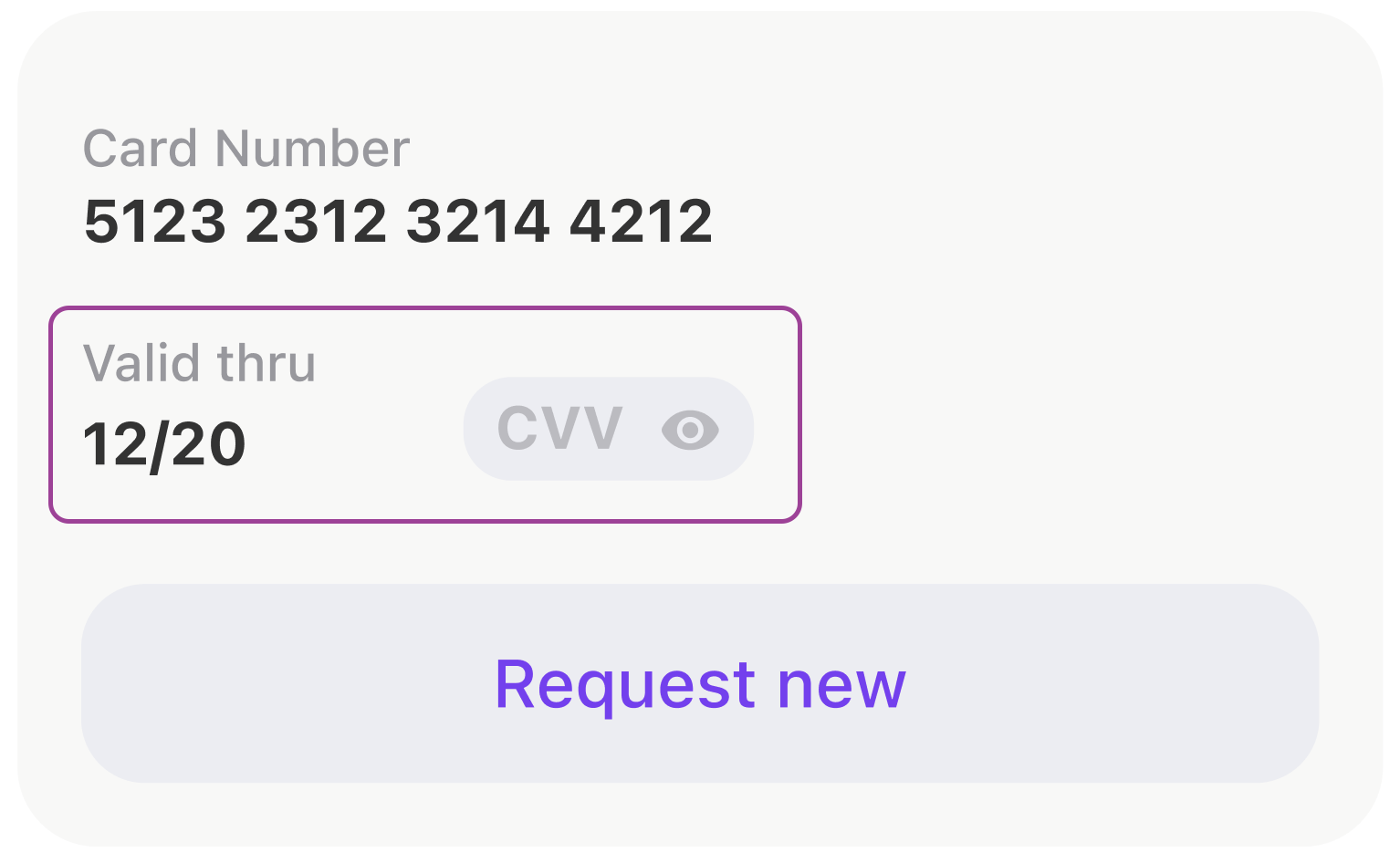
, .
- anchors.
[expireDateTitleLabel, expireDateLabel, cvcCodeView].forEach {
view.addSubview($0)
$0.translatesAutoresizingMaskIntoConstraints = false
}
NSLayoutConstraint.activate([
expireDateTitleLabel.topAnchor.constraint(equalTo: view.topAnchor),
expireDateTitleLabel.leftAnchor.constraint(equalTo: view.leftAnchor),
expireDateLabel.topAnchor.constraint(equalTo: expireDateTitleLabel.bottomAnchor, constant: 2),
expireDateLabel.leftAnchor.constraint(equalTo: view.leftAnchor),
expireDateLabel.bottomAnchor.constraint(equalTo: view.bottomAnchor),
cvcCodeView.leftAnchor.constraint(equalTo: expireDateTitleLabel.rightAnchor, constant: 44),
cvcCodeView.bottomAnchor.constraint(equalTo: view.bottomAnchor),
cvcCodeView.rightAnchor.constraint(equalTo: view.rightAnchor)
])
, UIStackView .
let stackView = UIStackView()
stackView.alignment = .bottom
stackView.axis = .horizontal
stackView.layoutMargins = .init(top: 0, left: 16, bottom: 0, right: 16)
stackView.isLayoutMarginsRelativeArrangement = true
let expiryDateStack: UIStackView = {
let stackView = UIStackView(
arrangedSubviews: [expireDateTitleLabel, expireDateLabel]
)
stackView.setCustomSpacing(2, after: expireDateTitleLabel)
stackView.axis = .vertical
stackView.layoutMargins = .init(top: 8, left: 0, bottom: 0, right: 0)
stackView.isLayoutMarginsRelativeArrangement = true
return stackView
}()
let gapView = UIView()
gapView.setContentCompressionResistancePriority(.defaultLow, for: .horizontal)
gapView.setContentHuggingPriority(.defaultLow, for: .horizontal)
stackView.addArrangedSubview(expiryDateStack)
stackView.addArrangedSubview(gapView)
stackView.addArrangedSubview(cvcCodeView)
, . . , WWDC SwiftUI. , Apple ! , , .
view.layoutUsing.stack {
$0.hStack(
alignedTo: .bottom,
$0.vStack(
expireDateTitleLabel,
$0.vGap(fixed: 2),
expireDateLabel
),
$0.hGap(fixed: 44),
cvcCodeView,
$0.hGap()
)
}
, SwiftUI
var body: some View {
HStack(alignment: .bottom) {
VStack {
expireDateTitleLabel
Spacer().frame(width: 0, height: 2)
expireDateLabel
}
Spacer().frame(width: 44, height: 0)
cvcCodeView
Spacer()
}
}
iOS- UITableView UICollectionView. , . , . : , . .
, . .
private let listAdapter = VerticalListAdapter<CommonCollectionViewCell>()
private let collectionView = UICollectionView(
frame: .zero,
collectionViewLayout: UICollectionViewFlowLayout()
)
.
func setupCollection() {
listAdapter.heightMode = .fixed(height: 8)
listAdapter.setup(collectionView: collectionView)
listAdapter.spacing = Constants.pocketSpacing
listAdapter.onSelectItem = output.didSelectPocket
}
. .
listAdapter.reload(items: viewModel.items)
, .
:
(UITableView -> UICollectionView).
,
,
, : , , , .
.
Shimmering Views
. (shimmering views).
- , UI .
, view, , .

, , .
SkeletonView, :
func makeStripAnimation() -> CAKeyframeAnimation {
let animation = CAKeyframeAnimation(keyPath: "locations")
animation.values = [
Constants.stripGradientStartLocations,
Constants.stripGradientEndLocations
]
animation.repeatCount = .infinity
animation.isRemovedOnCompletion = false
stripAnimationSettings.apply(to: animation)
return animation
}
:
protocol SkeletonDisplayable {...}
protocol SkeletonAvailableScreenTrait: UIViewController, SkeletonDisplayable {...}
extension SkeletonAvailableScreenTrait {
func showSkeleton(animated: Bool = false) {
addAnimationIfNeeded(isAnimated: animated)
skeletonViewController.view.isHidden = false
skeletonViewController.setLoading(true)
}
func hideSkeleton(animated: Bool = false) {
addAnimationIfNeeded(isAnimated: animated)
skeletonViewController.view.isHidden = true
skeletonViewController.setLoading(false)
}
}
, . :
setupSkeleton()
Smart skeletons
, , . , . .
- UI : , , , -:
public protocol SkeletonDrivenLoadableView: UIView {
associatedtype LoadableSubviewID: CaseIterable
typealias SkeletonBone = (view: SkeletonBoneView, excludedPinEdges: [UIRectEdge])
func loadableSubview(for subviewId: LoadableSubviewID) -> UIView
func skeletonBone(for subviewId: LoadableSubviewID) -> SkeletonBone
}
, , .
extension ActionButton: SkeletonDrivenLoadableView {
public enum LoadableSubviewID: CaseIterable {
case icon
case title
}
public func loadableSubview(for subviewId: LoadableSubviewID) -> UIView {
switch subviewId {
case .icon:
return solidView
case .title:
return titleLabel
}
}
public func skeletonBone(for subviewId: LoadableSubviewID) -> SkeletonBone {
switch subviewId {
case .icon:
return (ActionButton.iconBoneView, excludedPinEdges: [])
case .title:
return (ActionButton.titleBoneView, excludedPinEdges: [])
}
}
}
UI :
actionButton.setLoading(isLoading, shimmering: [.icon])
// or
actionButton.setLoading(isLoading, shimmering: [.icon, .title])
// which is equal to
actionButton.setLoading(isLoading)
, , , , .
, , . , .
, , , .
:
final class ScreenStateMachine: StateMachine<ScreenState, ScreenEvent> {
public init() {
super.init(state: .initial,
transitions: [
.loadingStarted: [.initial => .loading, .error => .loading],
.errorReceived: [.loading => .error],
.contentReceived: [.loading => .content, .initial => .content]
])
}
}
.
class StateMachine<State: Equatable, Event: Hashable> {
public private(set) var state: State {
didSet {
onChangeState?(state)
}
}
private let initialState: State
private let transitions: [Event: [Transition]]
private var onChangeState: ((State) -> Void)?
public func subscribe(onChangeState: @escaping (State) -> Void) {
self.onChangeState = onChangeState
self.onChangeState?(state)
}
@discardableResult
open func processEvent(_ event: Event) -> State {
guard let destination = transitions[event]?.first(where: { $0.source == state })?.destination else {
return state
}
state = destination
return state
}
public func reset() {
state = initialState
}
}
, .
func reloadTariffs() {
screenStateMachine.processEvent(.loadingStarted)
interactor.obtainTariffs()
}
, - .
protocol ScreenInput: ErrorDisplayable,
LoadableView,
SkeletonDisplayable,
PlaceholderDisplayable,
ContentDisplayable
, :
state machine :
final class DogStateMachine: StateMachine<ConfirmByCodeResendingState, ConfirmByCodeResendingEvent> {
init() {
super.init(
state: .laying,
transitions: [
.walkCommand: [
.laying => .walking,
.eating => .walking,
],
.seatCommand: [.walking => .sitting],
.bunnyCommand: [
.laying => .sitting,
.sitting => .sittingInBunnyPose
]
]
)
}
}
, ? .
public extension ScreenStateMachineTrait {
func setupScreenStateMachine() {
screenStateMachine.subscribe { [weak self] state in
guard let self = self else { return }
switch state {
case .initial:
self.initialStateDisplayableView?.setupInitialState()
self.skeletonDisplayableView?.hideSkeleton(animated: false)
self.placeholderDisplayableView?.setPlaceholderVisible(false)
self.contentDisplayableView?.setContentVisible(false)
case .loading:
self.skeletonDisplayableView?.showSkeleton(animated: true)
self.placeholderDisplayableView?.setPlaceholderVisible(false)
self.contentDisplayableView?.setContentVisible(false)
case .error:
self.skeletonDisplayableView?.hideSkeleton(animated: true)
self.placeholderDisplayableView?.setPlaceholderVisible(true)
self.contentDisplayableView?.setContentVisible(false)
case .content:
self.skeletonDisplayableView?.hideSkeleton(animated: true)
self.placeholderDisplayableView?.setPlaceholderVisible(false)
self.contentDisplayableView?.setContentVisible(true)
}
}
}
private var skeletonDisplayableView: SkeletonDisplayable? {
view as? SkeletonDisplayable
}
// etc.
}
.
.
, , , .
.
.
struct ErrorViewModel {
let title: String
let message: String?
let presentationStyle: PresentationStyle
}
enum PresentationStyle {
case alert
case banner(
interval: TimeInterval = 3.0,
fillColor: UIColor? = nil,
onHide: (() -> Void)? = nil
)
case placeholder(retryable: Bool = true)
case silent
}
ErrorDisplayable:
public protocol ErrorDisplayable: AnyObject {
func showError(_ viewModel: ErrorViewModel)
}
public protocol ErrorDisplayableViewTrait: UIViewController, ErrorDisplayable, AlertViewTrait {}
.
public extension ErrorDisplayableViewTrait {
func showError(_ viewModel: ErrorViewModel) {
switch viewModel.presentationStyle {
case .alert:
// show alert
case let .banner(interval, fillColor, onHide):
// show banner
case let .placeholder(retryable):
// show placeholder
case .silent:
return
}
}
}
, . , . , .
extension APIError: ErrorViewModelConvertible {
public func viewModel(_ presentationStyle: ErrorViewModel.PresentationStyle) -> ErrorViewModel {
.init(
title: Localisation.network_error_title,
message: message,
presentationStyle: presentationStyle
)
}
}
extension CommonError: ErrorViewModelConvertible {
public func viewModel(_ presentationStyle: ErrorViewModel.PresentationStyle) -> ErrorViewModel {
.init(
title: title,
message: message,
presentationStyle: isSilent ? .silent : presentationStyle
)
}
}
, , .
- 196,8934010152
- 138,2207792208
- 1
- 1
UI . , , .
, UI , , .
, -.
. . .
, . , , !