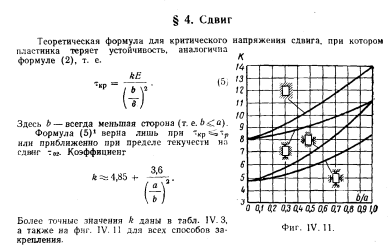
Es ist notwendig, die kritischen Schubspannungen basierend auf der Art der Befestigung und dem Seitenverhältnis der rechteckigen Platte zu bestimmen.
Beginnen wir mit der Einrichtung der Benutzeroberfläche und helfen Ihnen mit Scene Builder.
Erstellen wir einen Arbeitsbereich mit einer Größe von 900 x 600.
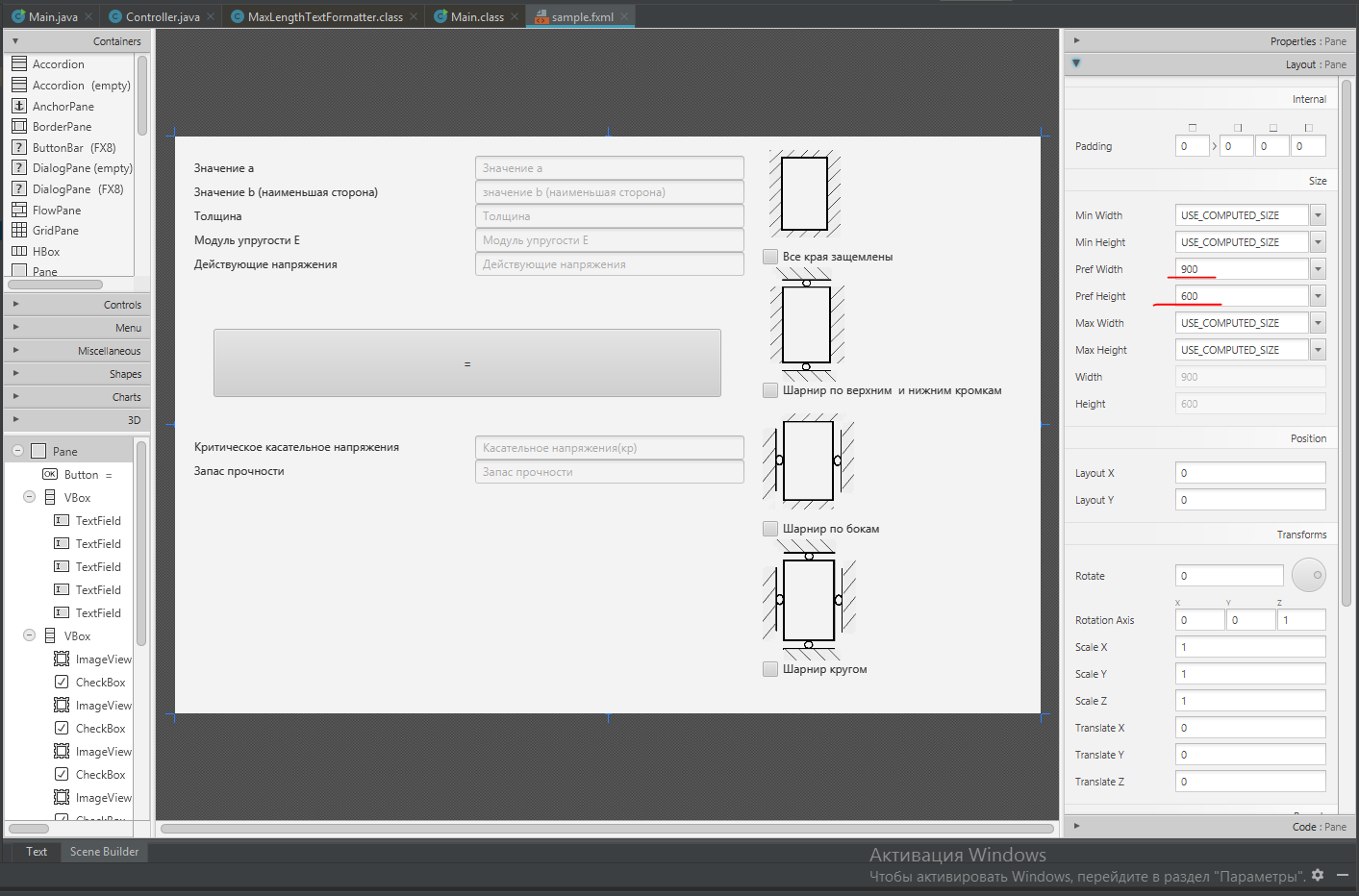
Lassen Sie uns mehrere Behälter mit Größen und Rändern erstellen (zuerst habe ich das Markup nur auf einem Stück Papier gemacht, aber das Stück war bereits verloren).
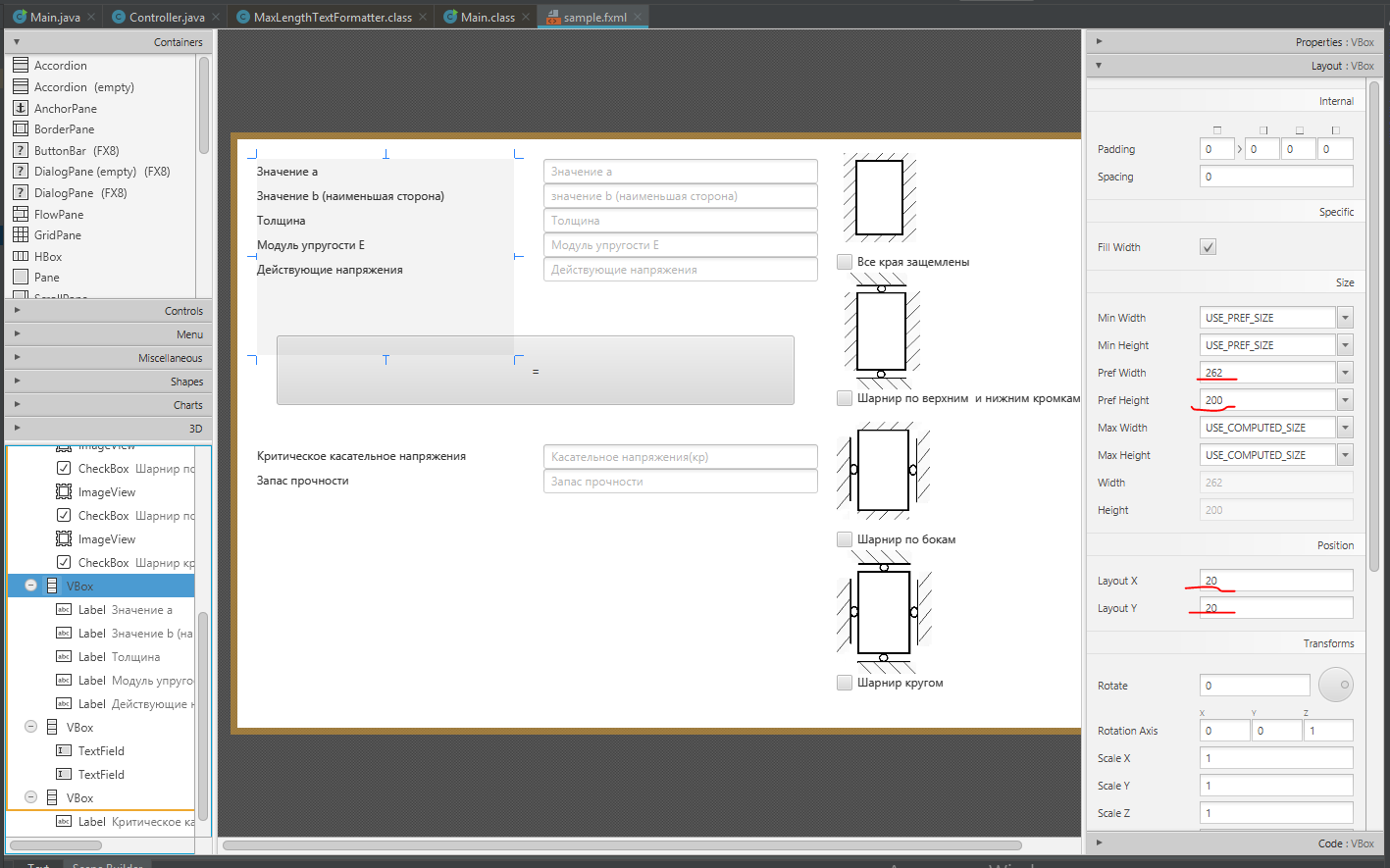
Als nächstes gehen wir die Interna der Container durch.
- Button Button
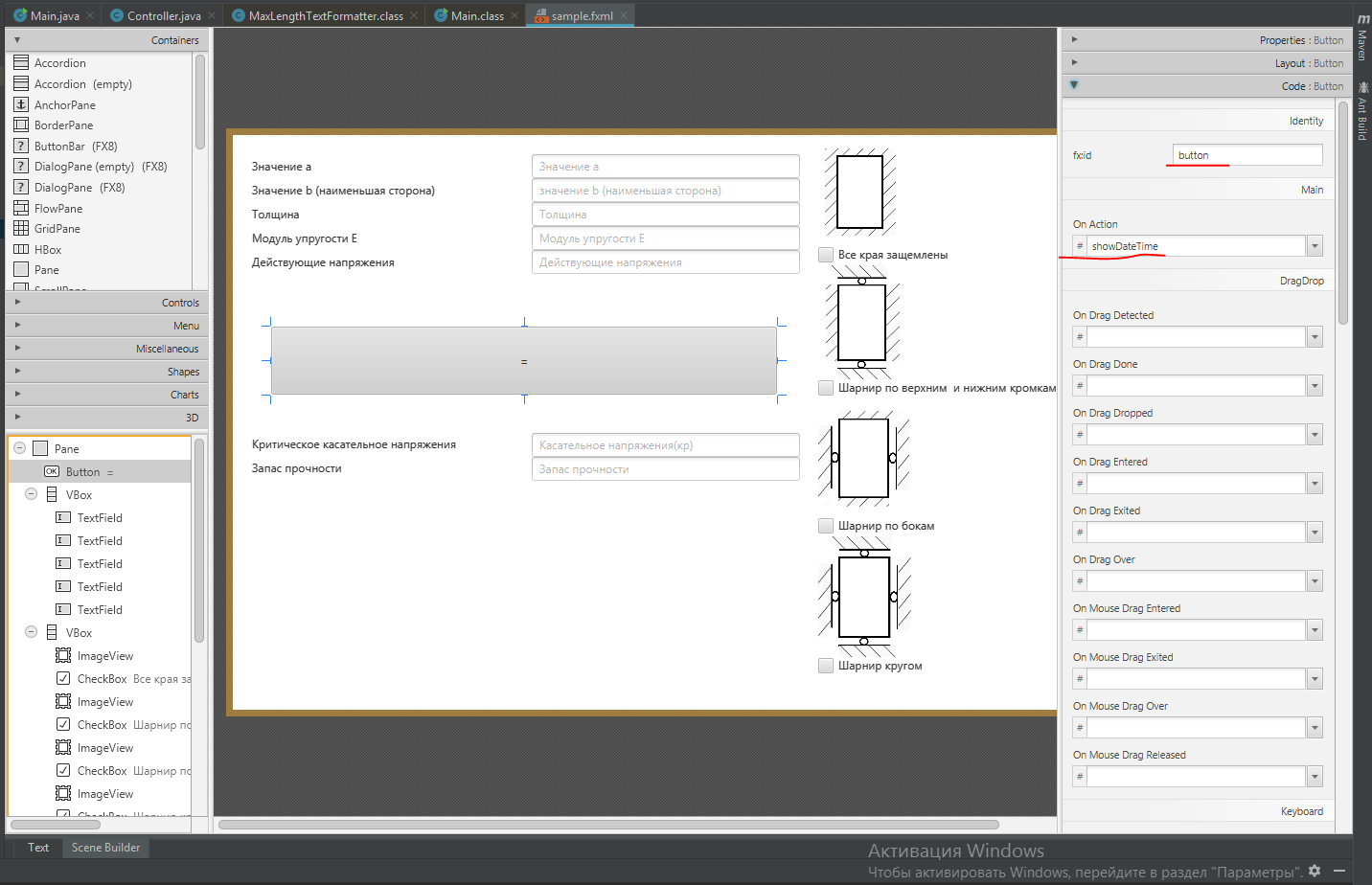
Weisen Sie unserem Button einen eindeutigen Namen und den Namen der Methode zu, in der wir dann unseren Code implementieren
- TextField
Geben Sie unserem Textfeld einen eindeutigen Namen. Das Feld wird zur Eingabe / Ausgabe von numerischen Werten benötigt. Wir werden dem Feld auch einen zusätzlichen Namen hinzufügen, der bei Eingabe durch ein Symbol verschwindet

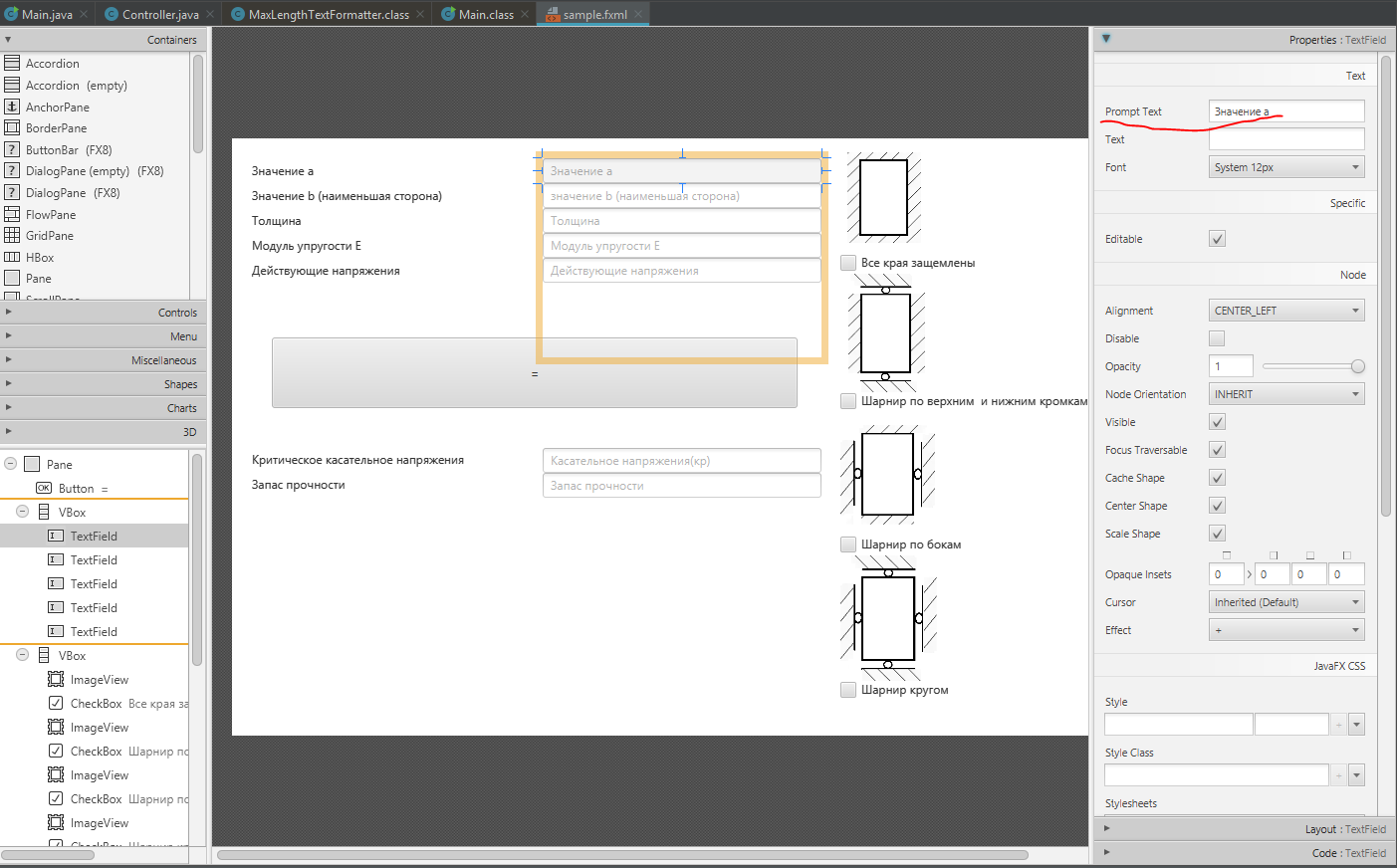
- Beschriftungsfeld
Ich habe das Beschriftungsfeld verwendet, um die Zellen zu kennzeichnen.
- Bildfeld
Hier geben wir den Namen eines vorhandenen Bildes an, das sich im Projekt befindet
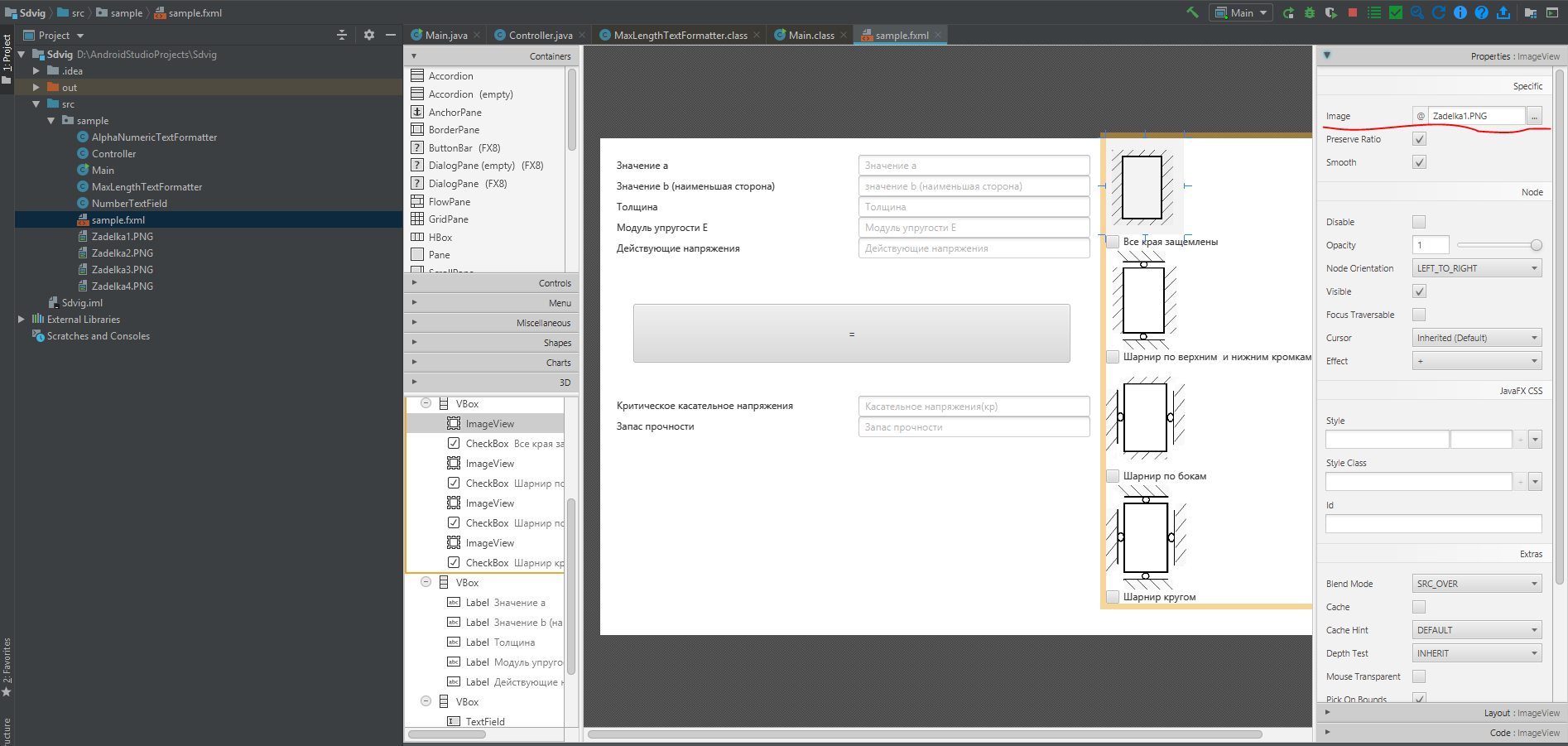
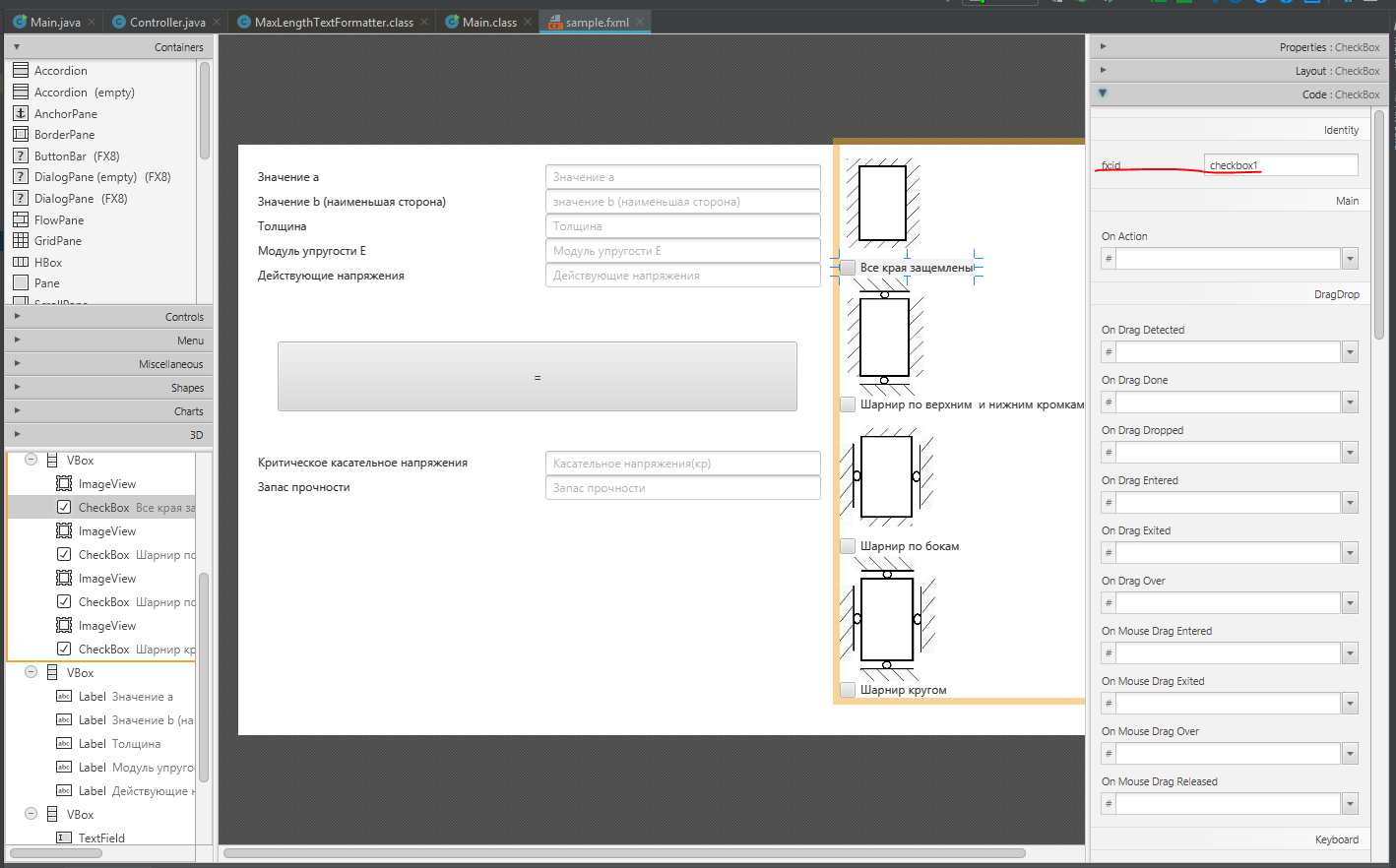
- CheckBox-Feld
Hier geben wir einen eindeutigen Namen an. Dies ist erforderlich, um die Art der Befestigung zu bestimmen
Endgültiger Code für die Datei sample.fxml
Listing sample.fxml
<?xml version="1.0" encoding="UTF-8"?>

<?import javafx.scene.control.Button?>
<?import javafx.scene.control.CheckBox?>
<?import javafx.scene.control.Label?>
<?import javafx.scene.control.TextField?>
<?import javafx.scene.image.Image?>
<?import javafx.scene.image.ImageView?>
<?import javafx.scene.layout.GridPane?>
<?import javafx.scene.layout.Pane?>
<?import javafx.scene.layout.VBox?>

<Pane prefHeight="600.0" prefWidth="900.0" xmlns="http://javafx.com/javafx/8.0.112" xmlns:fx="http://javafx.com/fxml/1" fx:controller="sample.Controller">

   <children>
      <Button fx:id="button" layoutX="40.0" layoutY="200.0" mnemonicParsing="false" onAction="#showDateTime" prefHeight="71.0" prefWidth="528.0" text="=" />

      <VBox layoutX="312.0" layoutY="20.0" minHeight="-Infinity" minWidth="-Infinity" prefHeight="200.0" prefWidth="280.0" GridPane.columnIndex="1">
         <children>
            <TextField fx:id="myTextField1" promptText=" " />
            <TextField fx:id="myTextField2" promptText=" b ( )" />
            <TextField fx:id="myTextField3" promptText="" />
            <TextField fx:id="myTextField4" prefHeight="25.0" prefWidth="280.0" promptText="  " />
            <TextField fx:id="myTextField6" prefHeight="25.0" prefWidth="280.0" promptText=" " />
         </children>
      </VBox>
      <VBox layoutX="611.0" prefHeight="562.0" prefWidth="271.0" GridPane.columnIndex="21">
         <children>
            <ImageView fx:id="image" fitHeight="116.0" fitWidth="174.0" pickOnBounds="true" preserveRatio="true">
               <image>
                  <Image url="@Zadelka1.PNG" />
               </image></ImageView>
            <CheckBox fx:id="checkbox1" mnemonicParsing="false" text="  " />
            <ImageView fitHeight="122.0" fitWidth="237.0" layoutX="30.0" pickOnBounds="true" preserveRatio="true">
               <image>
                  <Image url="@Zadelka2.PNG" />
               </image></ImageView>
            <CheckBox fx:id="checkbox2" mnemonicParsing="false" text="      " />
            <ImageView fitHeight="127.0" fitWidth="272.0" pickOnBounds="true" preserveRatio="true">
               <image>
                  <Image url="@Zadelka3.PNG" />
               </image></ImageView>
            <CheckBox fx:id="checkbox3" mnemonicParsing="false" text="  " />
            <ImageView fitHeight="129.0" fitWidth="392.0" pickOnBounds="true" preserveRatio="true">
               <image>
                  <Image url="@Zadelka4.PNG" />
               </image></ImageView>
            <CheckBox fx:id="checkbox4" mnemonicParsing="false" text=" " />
         </children>
      </VBox>

            <VBox layoutX="20.0" layoutY="20.0" minHeight="-Infinity" minWidth="-Infinity" prefHeight="200.0" prefWidth="262.0">
         <children>
            <Label prefHeight="25.0" prefWidth="185.0" text=" a" />
            <Label prefHeight="25.0" prefWidth="262.0" text=" b ( )" />
            <Label prefHeight="25.0" prefWidth="188.0" text="" />
            <Label prefHeight="25.0" prefWidth="186.0" text="  E" />
            <Label prefHeight="25.0" prefWidth="188.0" text=" " />
         </children>
      </VBox>
      <VBox layoutX="312.0" layoutY="311.0" prefHeight="200.0" prefWidth="280.0">
         <children>
            <TextField fx:id="myTextField5" prefHeight="25.0" prefWidth="280.0" promptText=" ()" />
            <TextField fx:id="myTextField7" prefHeight="25.0" prefWidth="280.0" promptText=" " />
         </children>
      </VBox>
      <VBox layoutX="20.0" layoutY="310.0" prefHeight="200.0" prefWidth="262.0">
         <children>
            <Label prefHeight="25.0" prefWidth="260.0" text="  " />
            <Label prefHeight="25.0" prefWidth="187.0" text=" " />
         </children>
      </VBox>
   </children>

</Pane>
Erstellen der Hauptmethode der Hauptklasse
Hauptklasse
package sample;

import javafx.application.Application;

import javafx.fxml.FXMLLoader;
import javafx.scene.Parent;
import javafx.scene.Scene;

import javafx.stage.Stage;


public class Main extends Application  {

    @Override

    public void start(Stage primaryStage) {
        try {
//  sample.fxml( ).
            Parent root = FXMLLoader.load(getClass().getResource("sample.fxml"));
            primaryStage.setTitle(" ");
            primaryStage.setScene(new Scene(root));
            primaryStage.show();

        } catch(Exception e) {
            e.printStackTrace();
        }
    }

    public static void main(String[] args)  {
        launch(args);
    }
}
Beim Erstellen der Controller-Klasse werden die wichtigsten mit Kommentaren markiert
Controller-Klasse
ackage sample;

import javafx.fxml.FXML;
import javafx.fxml.Initializable;
import javafx.scene.control.Button;
import javafx.scene.control.CheckBox;
import javafx.scene.control.TextField;
import javafx.stage.Stage;

import java.net.URL;
import java.util.ResourceBundle;

import static java.lang.Double.NaN;
import static java.lang.Double.parseDouble;
import static java.lang.String.valueOf;


public class Controller extends TextField implements Initializable  {


//
    @FXML
    private TextField myTextField4;
    @FXML
    private TextField myTextField1;
    @FXML
    private TextField myTextField2;
    @FXML
    private TextField myTextField3;
    @FXML
    private TextField myTextField5;
    @FXML
    private TextField myTextField6;
    @FXML
    private TextField myTextField7;
    @FXML
    private CheckBox checkbox1;
    @FXML
    private CheckBox checkbox2;
    @FXML
    private CheckBox checkbox3;
    @FXML
    private CheckBox checkbox4;

    private double k;
    private double krit;
    private double zapas;


    @Override
    public void initialize(URL location, ResourceBundle resources) {

        //
        myTextField1.setTextFormatter(new AlphaNumericTextFormatter());
        myTextField2.setTextFormatter(new AlphaNumericTextFormatter());
        myTextField3.setTextFormatter(new AlphaNumericTextFormatter());
        myTextField4.setTextFormatter(new AlphaNumericTextFormatter());
        //myTextField6.setTextFormatter(new AlphaNumericTextFormatter());
    }

    public void showDateTime() throws Exception {


//
        Double a = parseDouble(myTextField1.getText());
        Double b = parseDouble(myTextField2.getText());
        Double t = parseDouble(myTextField3.getText());
        Double e = parseDouble(myTextField4.getText());
        Double c = b / a;
//  CheckBox
        if (checkbox1.isSelected()) {
            if (c <= 0.1) {
                k = 8;
            } else if ((c > 0.1) && (c <= 0.15)) {
                k = 8.5;
            } else if ((c > 0.15) && (c <= 0.2)) {
                k = 8.8;
            } else if ((c > 0.2) && (c <= 0.25)) {
                k = 9;
            } else if ((c > 0.25) && (c <= 0.30)) {
                k = 9.2;
            } else if ((c > 0.3) && (c <= 0.35)) {
                k = 9.5;
            } else if ((c > 0.35) && (c <= 0.40)) {
                k = 9.8;
            } else if ((c > 0.40) && (c <= 0.45)) {
                k = 10.3;
            } else if ((c > 0.45) && (c <= 0.50)) {
                k = 10.5;
            } else if ((c > 0.5) && (c <= 0.55)) {
                k = 10.8;
            } else if ((c > 0.55) && (c <= 0.6)) {
                k = 11;
            } else if ((c > 0.6) && (c <= 0.65)) {
                k = 11.5;
            } else if ((c > 0.65) && (c <= 0.7)) {
                k = 11.8;
            } else if ((c > 0.7) && (c <= 0.75)) {
                k = 12;
            } else if ((c > 0.75) && (c <= 0.8)) {
                k = 12.5;
            } else if ((c > 0.8) && (c <= 0.85)) {
                k = 12.8;
            } else if ((c > 0.85) && (c <= 0.9)) {
                k = 13;
            } else if ((c > 0.9) && (c <= 0.95)) {
                k = 13.5;
            } else if ((c > 0.95) && (c <= 1)) {
                k = 14;
            }
            krit = (k * e) / (Math.pow((b / t), 2));

            String d = valueOf(krit);
            //
            myTextField5.setText(d);
            }
            else if (checkbox2.isSelected()) {
                if (c <= 0.1) {
                    k = 8;
                } else if ((c > 0.1) && (c <= 0.15)) {
                    k = 8.2;
                } else if ((c > 0.15) && (c <= 0.2)) {
                    k = 8.4;
                } else if ((c > 0.2) && (c <= 0.25)) {
                    k = 8.5;
                } else if ((c > 0.25) && (c <= 0.30)) {
                    k = 8.6;
                } else if ((c > 0.3) && (c <= 0.35)) {
                    k = 8.7;
                } else if ((c > 0.35) && (c <= 0.40)) {
                    k = 8.9;
                } else if ((c > 0.40) && (c <= 0.45)) {
                    k = 9;
                } else if ((c > 0.45) && (c <= 0.50)) {
                    k = 9.2;
                } else if ((c > 0.5) && (c <= 0.55)) {
                    k = 9.4;
                } else if ((c > 0.55) && (c <= 0.6)) {
                    k = 9.5;
                } else if ((c > 0.6) && (c <= 0.65)) {
                    k = 9.7;
                } else if ((c > 0.65) && (c <= 0.7)) {
                    k = 10;
                } else if ((c > 0.7) && (c <= 0.75)) {
                    k = 10;
                } else if ((c > 0.75) && (c <= 0.8)) {
                    k = 10.2;
                } else if ((c > 0.8) && (c <= 0.85)) {
                    k = 10.5;
                } else if ((c > 0.85) && (c <= 0.9)) {
                    k = 10.6;
                } else if ((c > 0.9) && (c <= 0.95)) {
                    k = 11;
                } else if ((c > 0.95) && (c <= 1)) {
                    k = 11;
                }
            krit = (k * e) / (Math.pow((b / t), 2));

            String d = valueOf(krit);
            myTextField5.setText(d);
            }

        else if (checkbox3.isSelected()) {
            if (c <= 0.1) {
                k = 4.9;
            } else if ((c > 0.1) && (c <= 0.15)) {
                k = 5.1;
            } else if ((c > 0.15) && (c <= 0.2)) {
                k = 5.2;
            } else if ((c > 0.2) && (c <= 0.25)) {
                k = 5.5;
            } else if ((c > 0.25) && (c <= 0.30)) {
                k = 5.8;
            } else if ((c > 0.3) && (c <= 0.35)) {
                k = 6;
            } else if ((c > 0.35) && (c <= 0.40)) {
                k = 6.2;
            } else if ((c > 0.40) && (c <= 0.45)) {
                k = 6.5;
            } else if ((c > 0.45) && (c <= 0.50)) {
                k = 6.9;
            } else if ((c > 0.5) && (c <= 0.55)) {
                k = 7;
            } else if ((c > 0.55) && (c <= 0.6)) {
                k = 7.5;
            } else if ((c > 0.6) && (c <= 0.65)) {
                k = 8;
            } else if ((c > 0.65) && (c <= 0.7)) {
                k = 8.2;
            } else if ((c > 0.7) && (c <= 0.75)) {
                k = 8.5;
            } else if ((c > 0.75) && (c <= 0.8)) {
                k = 9.1;
            } else if ((c > 0.8) && (c <= 0.85)) {
                k = 9.5;
            } else if ((c > 0.85) && (c <= 0.9)) {
                k = 10;
            } else if ((c > 0.9) && (c <= 0.95)) {
                k = 10.5;
            } else if ((c > 0.95) && (c <= 1)) {
                k = 11;
            }
            krit = (k * e) / (Math.pow((b / t), 2));

            String d = valueOf(krit);
            myTextField5.setText(d);
        }
        else if (checkbox4.isSelected()) {
            if (c <= 0.1) {
                k = 4.8;
            } else if ((c > 0.1) && (c <= 0.15)) {
                k = 5;
            } else if ((c > 0.15) && (c <= 0.2)) {
                k = 5;
            } else if ((c > 0.2) && (c <= 0.25)) {
                k = 5.1;
            } else if ((c > 0.25) && (c <= 0.30)) {
                k = 5.2;
            } else if ((c > 0.3) && (c <= 0.35)) {
                k = 5.4;
            } else if ((c > 0.35) && (c <= 0.40)) {
                k = 5.5;
            } else if ((c > 0.40) && (c <= 0.45)) {
                k = 5.6;
            } else if ((c > 0.45) && (c <= 0.50)) {
                k = 5.9;
            } else if ((c > 0.5) && (c <= 0.55)) {
                k = 6;
            } else if ((c > 0.55) && (c <= 0.6)) {
                k = 6.2;
            } else if ((c > 0.6) && (c <= 0.65)) {
                k = 6.5;
            } else if ((c > 0.65) && (c <= 0.7)) {
                k = 6.7;
            } else if ((c > 0.7) && (c <= 0.75)) {
                k = 7;
            } else if ((c > 0.75) && (c <= 0.8)) {
                k = 7.1;
            } else if ((c > 0.8) && (c <= 0.85)) {
                k = 7.4;
            } else if ((c > 0.85) && (c <= 0.9)) {
                k = 7.8;
            } else if ((c > 0.9) && (c <= 0.95)) {
                k = 8;
            } else if ((c > 0.95) && (c <= 1)) {
                k = 8.3;
            }
            krit = (k * e) / (Math.pow((b / t), 2));
            String d = valueOf(krit);
            myTextField5.setText(d);

        }
        Double f = parseDouble(myTextField6.getText());
            zapas = krit/f;
            String g = valueOf(zapas);
            myTextField7.setText(g);
        }
        }
Erstellung von zwei Klassen zur Anwendung des Dateneingabefilters (ausgenommen Buchstaben sowie die Möglichkeit, die Anzahl der Ein- / Ausgänge zu begrenzen). Die Lösung ist nicht meine, aber ich habe sie im Stackoverflow gefunden. Von allen vorgeschlagenen Lösungen schien sie mir die einfachste und verständlichste zu sein.
AlphaNumericTextFormatter-Klasse
AlphaNumericTextFormatter-Klasse
public class AlphaNumericTextFormatter extends TextFormatter<String> {

    /** The Constant ALPHA_NUMERIC_ONLY. */
    //private static final String ALPHA_NUMERIC_ONLY = "^[a-zA-Z0-9]*$";
    /** MAKE NUMERIC ONLY **/
    private static final String DIGITS_ONLY = "^[0-9.]*$";

    /**
     * Instantiates a new alpha numeric text formatter.
     */
    public AlphaNumericTextFormatter() {
        super(applyFilter(null));
    }

    /**
     * Instantiates a new alpha numeric text formatter.
     *
     * @param maxLength
     *            the max length
     */
    public AlphaNumericTextFormatter(int maxLength) {
        super(applyFilter(new MaxLengthTextFormatter(maxLength).getFilter()));
    }

    /**
     * Apply filter.
     *
     * @param filter
     *            the filter
     * @return the unary operator
     */
    private static UnaryOperator<Change> applyFilter(UnaryOperator<Change> filter) {
        return change -> {
            if (change.getControlNewText() != null && change.getControlNewText().matches(DIGITS_ONLY)) {
                if (filter != null) {
                    filter.apply(change);
                }
                return change;
            }
            return null;
        };
    }

}
MaxLengthTextFormatter-Klasse
Codeauflistung
package sample;

import java.util.function.UnaryOperator;
import javafx.scene.control.TextFormatter;
import javafx.scene.control.TextFormatter.Change;

public class MaxLengthTextFormatter extends TextFormatter<String> {
    private int maxLength;

    public MaxLengthTextFormatter(final int maxLength) {
        super(new UnaryOperator<Change>() {
            public Change apply(Change change) {
                if (change.isDeleted()) {
                    if (change.getControlNewText().length() > maxLength) {
                        change.setText(change.getText().substring(0, maxLength));
                    }
                } else if (change.getControlText().length() + change.getText().length() >= maxLength) {
                    int maxPos = maxLength - change.getControlText().length();
                    change.setText(change.getText().substring(0, maxPos));
                }

                return change;
            }
        });
        this.maxLength = maxLength;
    }

    public int getMaxLength() {
        return this.maxLength;
    }
}
Nun, am Ende der Erstellung der JAR-Datei
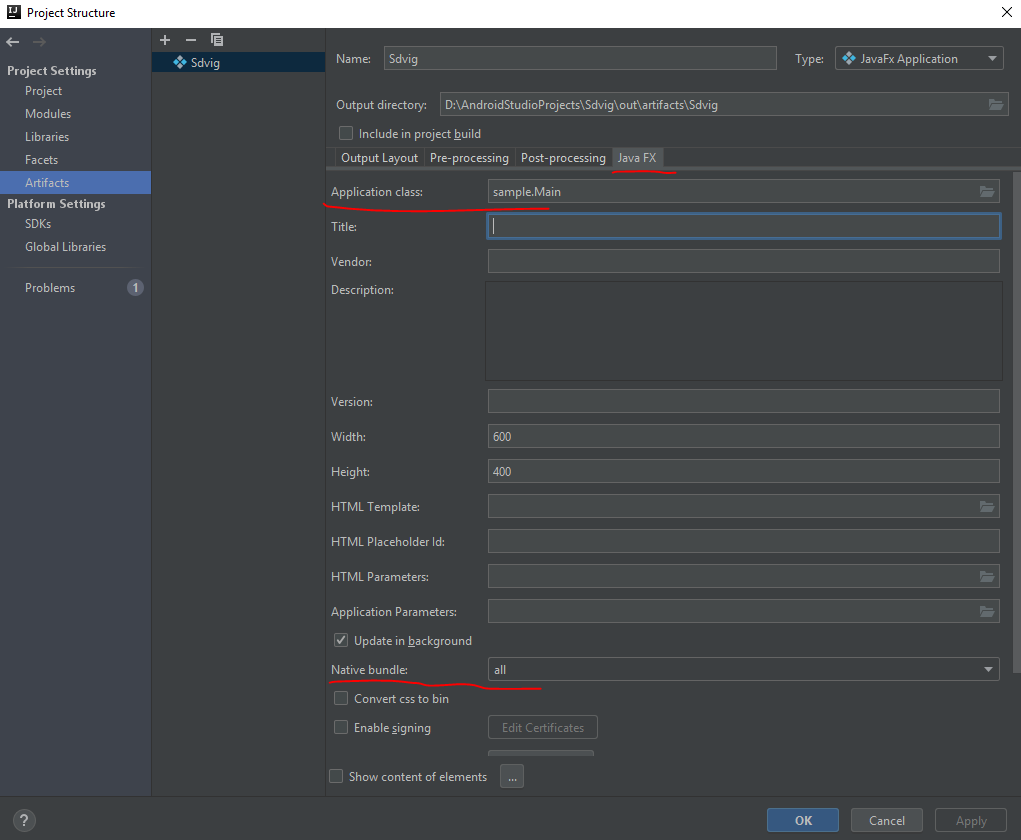

Das ist alles. Jetzt ist die Datei fertig, die auf jedem Computer mit installiertem Java ausgeführt werden kann.