Im heutigen Artikel werden wir das letzte Puzzleteil an seine Stelle setzen. Wir werden Ihnen den Fallmanagement-Teil unseres SOC vorstellen. Wir haben zwei Open Source-Technologien verwendet - TheHive und Cortex.
TheHive wird als Alert-Management-Plattform für unser Projekt verwendet, mit der Incident-Alerts von der Erstellung bis zum Abschluss verwaltet werden können. Inzwischen ist Cortex ein ergänzendes Softwareprodukt aus demselben Team wie TheHive, das es mit seinen "Parsern" und "Respondern" um Funktionen zur Datenanreicherung ergänzt.
Inhaltsverzeichnis für alle Beiträge.
- Einführung. Bereitstellung von Infrastruktur und Technologie für SOC as a Service (SOCasS)
- ELK Stack - Installation und Konfiguration
- Spaziergang durch die offene Distribution
- Dashboards und ELK SIEM-Visualisierung
- Integration mit WAZUH
- Alarmierung
- Bericht erstellen
- Fallmanagement
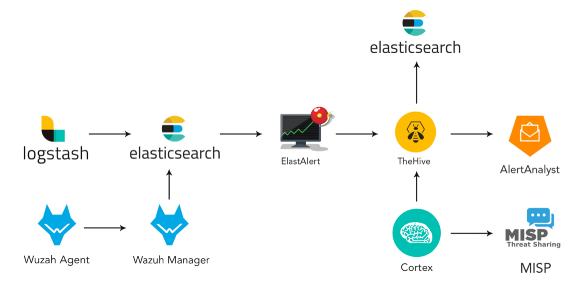
Dieser Artikel ist in folgende Abschnitte unterteilt:
- Installieren und Konfigurieren von TheHive und Cortex.
- TheHive- und Cortex-Übersichtssymbolleisten
- Cortex-Integration mit TheHive
- MISP-Installation und Integration in TheHive
- Untersuchung: Fallmanagement
1- TheHive Cortex:
TheHive 3.4.0–1 Cortex 3.0.1–1.
TheHive , Elasticsearch . docker-compose, Docker. Elasticsearch , Docker.
:
https://github.com/TheHive-Project/TheHiveDocs/blob/master/installation/install-guide.md
. TheHive ElasticSearch . Java. 8vCPU, 8 60 . .
. : docker-compose.yml Elasticsearch, TheHive Cortex :
version: "2"
services:
  elasticsearch:
    image: elasticsearch:6.8.0
    ports:
      - "0.0.0.0:9200:9200"
    environment:
      - http.host=0.0.0.0
      - cluster.name=hive
      - thread_pool.index.queue_size=100000
      - thread_pool.search.queue_size=100000
      - thread_pool.bulk.queue_size=100000
    ulimits:
      nofile:
        soft: 65536
        hard: 65536
  cortex:
    image: thehiveproject/cortex:3.0.1
    depends_on:
      - elasticsearch
    ports:
      - "0.0.0.0:9001:9001"
  thehive:
    image: thehiveproject/thehive:3.4.0
        depends_on:
      - elasticsearch
      - cortex
    ports:
      - "0.0.0.0:9000:9000"
    command: --cortex-port 9001
/ docker-composer.yml :
sudo sysctl -w vm.max_map_count=524288:
docker-compose upTheHive 9000/tcp, Cortex — 9001/tcp. , docker-compose.
, : docker ps –a

, Elasticsearch:

! , TheHive:
2- TheHive Cortex
. 9000,9001,9200, .

:

:

! TheHive:

Cortex Dashboard:

, - , TheHive.

! Cortex : , , .
, +Add Organization .

+Add User.
OrgAdmin.
«New Password» . Enter, .
.
Organization .

«Analyzers» , «Analyzers», .
Cortex , . 124.

. .
API-, , .
3- Cortex TheHive:
Users TheHive. . , «Create API Key» . , . application.conf :

cortex {
  "CORTEX-SERVER-ID" {
    # URL of the Cortex server
    url = "http://172.18.0.3:9001"
    # Key of the Cortex user, mandatory for Cortex 2
    key = "nBqA7B6BYc1kHhgAXZOYoXjBnt5vlCgM"
  }
}
url = http://your_cortex_container_ip:cortexPort
= " API, "
docker inspect <id-container> IP-
, docker-compose.yml:
thehive
volumes:
- /home/your_user/application.conf:/etc/thehive/application.conf
— cortex-key < api_key, stp>

.
docker-compose up.
Hive , , about , :

, Cortex TheHive.
4- MISP TheHive:
4–1 MISP:
sudo apt-get update -y && sudo apt-get upgrade -y
sudo apt-get install mysql-client -y
curl https://raw.githubusercontent.com/MISP/MISP/2.4/INSTALL/INSTALL.sh -o misp_install.sh
chmod +x misp_install.sh
./misp_install.sh -A
baseurl, IP:
https://_IP/
«misp», «y».
PS: 80 443 .
https://_IP/, :

, :
: admin@admin.test
: admin
MISP:
- MISP> > (MISP Server webpage > Administration > Add User)
. : cortex_integration@admin.test
ORGNAME
— (user)
AuthKey

Cortex > Organization > Analyzers
«misp»
Enable “MISP_2_0”
MISP
URL = https: // <MISP_IP>
key = AuthKey MISP,
cert_check: False

MISP server webpage > Sync Actions > List Feeds.
, , . IP- .
Cortex + New Analysis, IP IP.
The MISP_2_0 analyzer .
«View», , IP-, , .
TheHive IP- .
5- : TheHive:
TheHive . TheHive , . , , , , .

. , TLP, . , , . , , , .
, . , .
. , , .
, . , , C2 , IOC.

:
SOC , , . , , , . , , . TheHive , .

, . , , , , , , . , . , . , .
, TheHive . — . TheHive . , IP-, , HTTP-URI . . , , .

. , , . , . , Cortex OSINT. , API , . Passive Total, Virus Total Domain Tools.
, «» :

, . .